Newcomer
June 11, 2024
Solved

Why it doesn't fill up the recipient's full name in field when preview?

  • June 11, 2024
  • 3 replies
  • 263 views

Why it doesn't fill up the recipient's  full name ( or any info) in field when preview? 

Best answer by JohnSantos

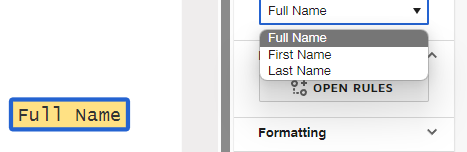
@payal.dave - If you are using a Full Name tag, make sure that the recipient’s information has been added.  Also, select the Full Name option for the tag options on the right menu.


You might also have a browser issue when you preview the envelope.  Try using another browser like Chrome, Firefox, Edge, and Safari.  An outdated browser can cause compatibility issues.

3 replies

JohnSantos
Guru
Guru
June 12, 2024

@payal.dave - If you are using a Full Name tag, make sure that the recipient’s information has been added.  Also, select the Full Name option for the tag options on the right menu.


You might also have a browser issue when you preview the envelope.  Try using another browser like Chrome, Firefox, Edge, and Safari.  An outdated browser can cause compatibility issues.

Welcome to the DocuSign Community! Your feedback is highly valued. If you find my response helpful, please give it a "Like" and consider marking it as the "Best Answer" to assist others with similar issues.
Newcomer
June 13, 2024

Thank you.

Docusign Employee
June 28, 2024

Hi @payal.dave,


I hope you are doing well.


I would like to confirm if you were able to solve your issue by utilizing the solution that was suggested? 


If so, please mark it as the best answer by clicking “Select as Best” to make it easier for other users to find.


Otherwise, feel free to let me know and I will gladly help you address the situation as soon as possible.


Best regards,   

Alejandro R. | Docusign Community Moderator   

"Select as Best" below if you find the answer a valid solution to your issue!