Riskoptima
Newcomer
Newcomer
April 10, 2024
Solved

Started getting an error message right after I tried to authenticate my own signature

  • April 10, 2024
  • 2 replies
  • 167 views

I received the attached error message. What should I do?

Best answer by Vinicius.Rodrigues

Hi @Riskoptima !

This message is telling us that your account setting is mandatory at least one authentication method for each recipient in all envelopes. Authentication method can be a Phone Authentication, SMS Authentication, and Knowledge-Based ID checks, for example.

If you have an Admin profile and would like to change this setting to “optional” or “none”, you can access Settings > Security Settings > Recipient Authentication Settings (under Authentication Settings).
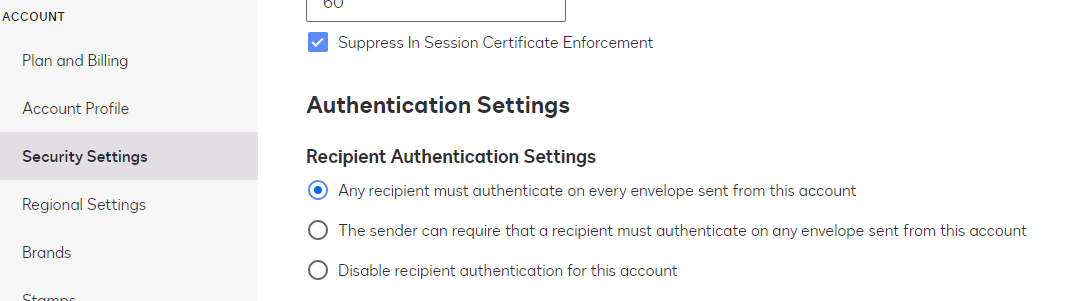
 

Please, check this article to get more information: Authentication Settings


I hope I answered your question! Let me know if there's anything else!

2 replies

Vinicius.Rodrigues
Docusign Employee
Docusign Employee
April 11, 2024

Hi @Riskoptima !

This message is telling us that your account setting is mandatory at least one authentication method for each recipient in all envelopes. Authentication method can be a Phone Authentication, SMS Authentication, and Knowledge-Based ID checks, for example.

If you have an Admin profile and would like to change this setting to “optional” or “none”, you can access Settings > Security Settings > Recipient Authentication Settings (under Authentication Settings).


Please, check this article to get more information: Authentication Settings


I hope I answered your question! Let me know if there's anything else!

"Select as Best" below if you find my answer is a valid solution to your issue and mark it as resolved.
Docusign Employee
April 25, 2024

Hi @Riskoptima,


I hope you are doing well.


I would like to confirm if you were able to solve your issue by utilizing the solution that was suggested or if the information that was provided was useful.


If so, please mark it as the best answer by clicking “Select as Best” to make it easier for other users to find.


Otherwise, feel free to let me know and I will gladly help you address the situation as soon as possible.


Best regards,


Christopher | Docusign Community Moderator

"Select as Best" below if you find the answer a valid solution to your issue.