Newcomer
April 25, 2024
Solved

How to configure Automated phone call for recipients without cellular phone ?

  • April 25, 2024
  • 2 replies
  • 63 views

For recipients without cellular phone, ‘Automated phone call option’ is mentioned on Docusign support web page :

https://support.docusign.com/s/document-item?language=fr&rsc_301=&bundleId=gav1643676262430&topicId=rzi1578456523624.html&_LANG=frfr


What is procedure to configure such option for a recipient living in Canada ?

Thanks

 

Best answer by Alexandre.Augusto

Hello, @Hugues 


Welcome to the Docusign Community!


SMS and Phone Authentication is an Add-On accordingly an account plan.

I suggest to you contact our Sales team asking about it.


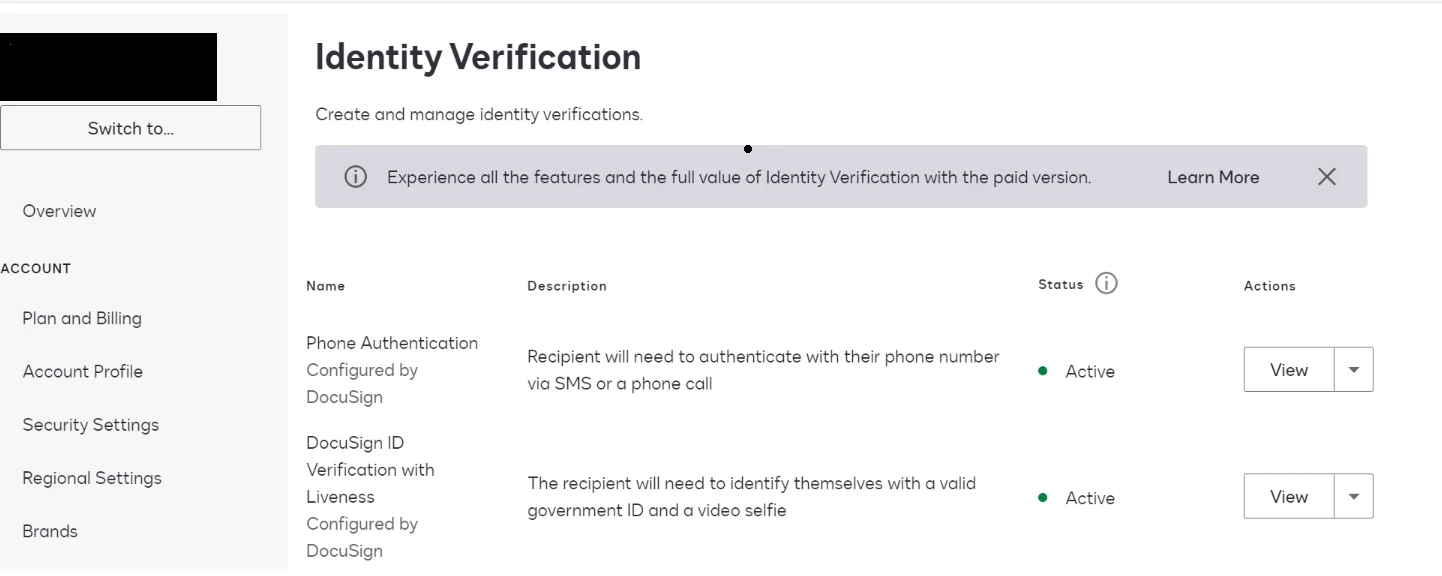
After be enabled in the account, you will see this setting:


Sales team in USA can be contact by phone: 

1 (877) 720-2040 


Or using this link:

https://t.ly/XS98I


I hope that helps!

Alexandre 

2 replies

Alexandre.Augusto
Docusign Employee
Docusign Employee
April 25, 2024

Hello, @Hugues 


Welcome to the Docusign Community!


SMS and Phone Authentication is an Add-On accordingly an account plan.

I suggest to you contact our Sales team asking about it.


After be enabled in the account, you will see this setting:


Sales team in USA can be contact by phone: 

1 (877) 720-2040 


Or using this link:

https://t.ly/XS98I


I hope that helps!

Alexandre 

Your feedback is very appreciated! You can give a Like and mark this answer as the "Best Answer" for your issue. DocuSign University http://dsucustomers.docusign.com
Docusign Employee
May 10, 2024

Hi @Hugues,


I hope you are doing well.


I would like to confirm if you were able to solve your issue by utilizing the solution that was suggested? 


If so, please mark it as the best answer by clicking “Select as Best” to make it easier for other users to find.


Otherwise, feel free to let me know and I will gladly help you address the situation as soon as possible.


Best regards,   

Alejandro R. | Docusign Community Moderator   

"Select as Best" below if you find the answer a valid solution to your issue!