Newcomer
April 22, 2024
Solved

Edit Signature Module Part 11

  • April 22, 2024
  • 2 replies
  • 71 views

Hello,

-How can I change The language of the auto generate text by module part 11 ?

I’m French and I would like to have the informations in english in my document (see screen below) 
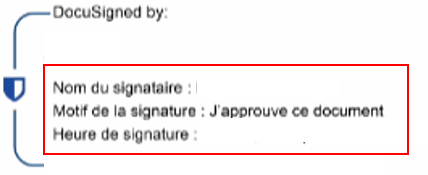
-And Can I manage the size of these texts ?


Thanks for yours answers

Best answer by Michael.Rave

@Maxence 

The language of your Docusign account as the sender is taken by default, if not otherwise specified in the template or envelope. You need to enable “Set Recipient language” and change this to English for the signer.

2 replies

Michael.Rave
Docusign Employee
Docusign Employee
April 22, 2024

@Maxence 

The language of your Docusign account as the sender is taken by default, if not otherwise specified in the template or envelope. You need to enable “Set Recipient language” and change this to English for the signer.

"Select as Best" below if you find my answer is a valid solution to your issue and mark it as resolved.
Docusign Employee
May 6, 2024

Hello @Maxence ,


If you found the provided response to be a useful solution to your question, please mark it as the best answer by clicking “Select as Best” to make it easier for other users to find.


Best regards,

Nathaly | Docusign Community Moderator
"Select as Best" below if you find the answer a valid solution to your issue!

