Newcomer
June 20, 2024
Solved

Drop Down box

  • June 20, 2024
  • 2 replies
  • 86 views

I added drop down boxes to a document, but I have to select the information all the way on the right side of the program. Why does by list not drop down when I click on the drop down arrow?

Best answer by JohnSantos

@Simple Management 

Try testing your template or envelope in a different browser to rule out any browser incompatibility issues. 

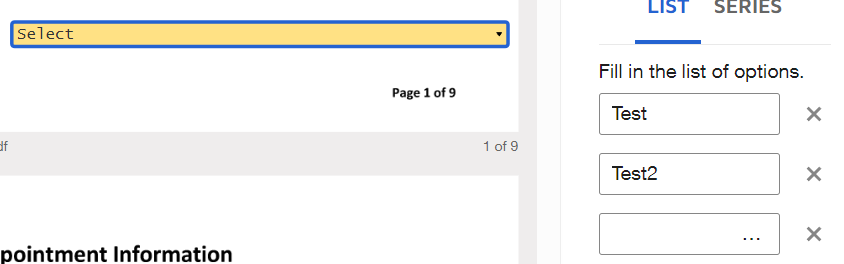
The next thing you can do is check if you have any extra characters (spaces) on your list of options.  In this example, I added spaces to the 3rd option and it expand that number of characters.   If that is not what you are experiencing, please share a image of what you see.


2 replies

JohnSantos
Guru
Guru
June 23, 2024

@Simple Management 

Try testing your template or envelope in a different browser to rule out any browser incompatibility issues. 

The next thing you can do is check if you have any extra characters (spaces) on your list of options.  In this example, I added spaces to the 3rd option and it expand that number of characters.   If that is not what you are experiencing, please share a image of what you see.


Welcome to the DocuSign Community! Your feedback is highly valued. If you find my response helpful, please give it a "Like" and consider marking it as the "Best Answer" to assist others with similar issues.
Docusign Employee
July 9, 2024

Hi @Simple Management,


I hope you are doing well.


I would like to confirm if you were able to solve your issue by utilizing the solution that was suggested? 


If so, please mark it as the best answer by clicking “Select as Best” to make it easier for other users to find.


Otherwise, feel free to let me know and I will gladly help you address the situation as soon as possible.


Best regards,   

Alejandro R. | Docusign Community Moderator   

"Select as Best" below if you find the answer a valid solution to your issue!