Solved

Document name changing

  • June 13, 2024
  • 4 replies
  • 273 views

Forum|alt.badge.img+1

How do I stop Docusign from changing the name of my PDF when it returns to me?

Eg: Docusign Contract 06-12-2024  (on return the name is ACGFBDZ23498AGFCBGKJNFLKDJLNFD)

Why does it do this, its so time consuming to rename everything on download after signatures are complete.


Jackie
Best answer by Vinicius.Rodrigues

Hi @jdallamore !

This is not a expect behavior from our platform. Could you please provide more details how are you downloading your documents?

Can you this this steps below and check if the result is the same?

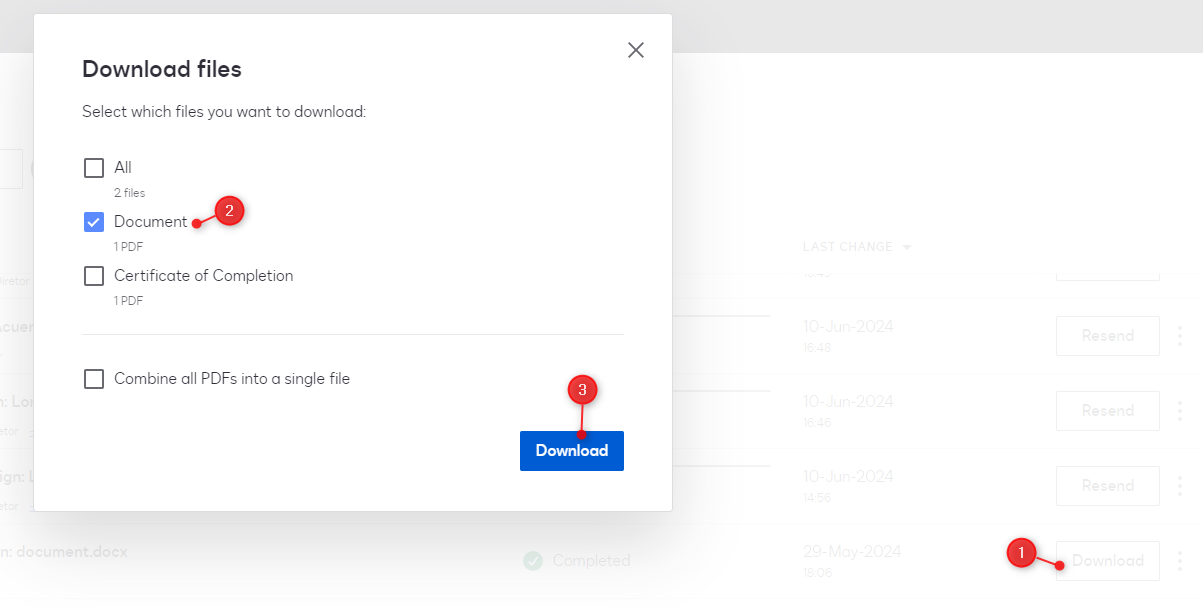
  1. After login in your account, go to Agreements menu (on the top);
  2. Localize one Completed (status) envelope;
  3. Click on Download;
  4. Select Document only and then click on Download.


Let me know if this solution works for you!

4 replies

Vinicius.Rodrigues
Docusign Employee
Forum|alt.badge.img+19

Hi @jdallamore !

This is not a expect behavior from our platform. Could you please provide more details how are you downloading your documents?

Can you this this steps below and check if the result is the same?

  1. After login in your account, go to Agreements menu (on the top);
  2. Localize one Completed (status) envelope;
  3. Click on Download;
  4. Select Document only and then click on Download.


Let me know if this solution works for you!


Forum|alt.badge.img+17

Hi @jdallamore,


Welcome to the Docusign Community!


We are glad to have you here and can't wait to help share as much knowledge as possible.


I am sorry to hear that your document is being renamed upon completion, but I will help you get to the bottom of the issue.


DocuSign eSignature should not rename documents in an envelope, unless these have been downloaded as a “Combined” PDF. In this scenario the name will reflect the envelope’s subject.


Have you verified if the document’s name is changed when the envelope is sent, or, does it only happen when all recipients have completed their action?


Also, how are you creating your envelopes?


I would like to confirm in specific if you are starting your envelopes in Agreements>Start>Envelopes>Send an Envelope.


In the meantime you will want to try again using a different device, network, and browser. Please try these options separately, as they may lead us to the root cause of the issue.


Feel free to let us know if you need further assistance with this. 


Thank you for using Docusign, we hope you have a wonderful rest of your day! 


Best regards,


Alejandro R. | Docusign Community Moderator  


Please click "Best Answer" below if you find my reply to be a valid solution to your issue!


Forum|alt.badge.img
  • New Voice
  • May 14, 2026

Hi! I would like to follow up on this thread. Could you please consider updating the software to keep the original file naming convention (plus perhaps a “signed” addition at the end of the filename) when you download a combined file? This would be extremely helpful as we have a need for the combined file. Thanks for your consideration.


Forum|alt.badge.img+5

Hi ​@mmdavis02,


We appreciate you reaching out to the Docusign Community and are delighted to have you join us.

We understand your concern about the filename changing after download. We apologize for the inconvenience, and we’ll be happy to help.

There were similar ideas posted that were already submitted. You can copy your comment and add it to this submitted idea for Docusign to consider. Also, make sure to vote for the idea submitted.


Thank you for sharing your insight!


Best regards,

Noralynn | Docusign Community Moderator

Feel free to Like👍and click "Best Answer."


