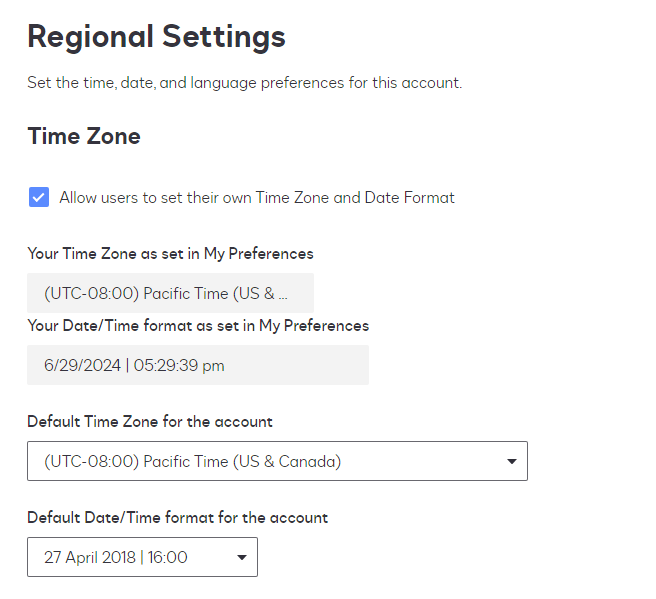
It sounds like the issue may be due to your DocuSign account's regional settings overriding the signer's local time zone. If your account allows users to set their own time zone, and this signatory doesn't have an account, the default settings from your account might apply to them. Check your regional settings in DocuSign to ensure they are set correctly and consider adjusting the default time zone settings if needed.
Welcome to the DocuSign Community! Your feedback is highly valued. If you find my response helpful, please give it a "Like" and consider marking it as the "Best Answer" to assist others with similar issues.
It sounds like the issue may be due to your DocuSign account's regional settings overriding the signer's local time zone. If your account allows users to set their own time zone, and this signatory doesn't have an account, the default settings from your account might apply to them. Check your regional settings in DocuSign to ensure they are set correctly and consider adjusting the default time zone settings if needed.
Translate
Welcome to the DocuSign Community! Your feedback is highly valued. If you find my response helpful, please give it a "Like" and consider marking it as the "Best Answer" to assist others with similar issues.
If you found the provided response to be a useful solution to your question, please mark it as the best answer by clicking “Select as Best” to make it easier for other users to find.
Best regards,
Nathaly | Docusign Community Moderator "Select as Best" below if you find the answer a valid solution to your issue!
You can login or register as either a Docusign customer or developer. If you don’t already have a Docusign customer or developer account, you can create one for free when registering.
You can login or register as either a Docusign customer or developer. If you don’t already have a Docusign customer or developer account, you can create one for free when registering.
 Back to Docusign.com