New Voice
August 10, 2024
Solved

Clearing old signers

  • August 10, 2024
  • 4 replies
  • 284 views

Hello All~

I have been using Docusign for so long that it has collected thousands of names as “signers.” I have had a couple of “oops.”  Is there a way to clear out all the signers, almost a refresh?

Thank you!

Best answer by Pawan Gangwani

Hello @Deirdre 

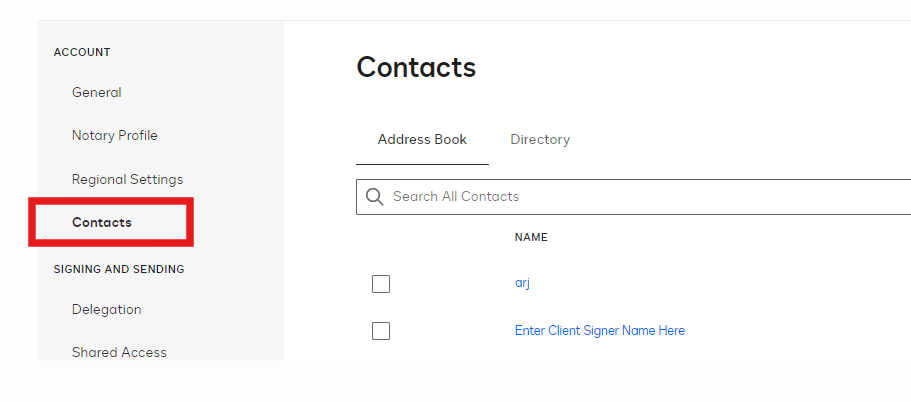
I hope you are doing great. So for clearing the signer, you need to navigate to the “My Preferences” in profile. Then click on “Contacts” in left hand panel and you can delete selected or all the contacts.


Thanks!

4 replies

Michael.Rave
Docusign Employee
Docusign Employee
August 12, 2024

@Deirdre 

The recipients you entered get added to your personal address book as contacts.

This Docusign Support article explains how you can manage the contacts. 

"Select as Best" below if you find my answer is a valid solution to your issue and mark it as resolved.
Pawan Gangwani
Hero
Hero
August 12, 2024

Hello @Deirdre 

I hope you are doing great. So for clearing the signer, you need to navigate to the “My Preferences” in profile. Then click on “Contacts” in left hand panel and you can delete selected or all the contacts.


Thanks!

Way to Learn | I'd love your feedback | Hit Like | Mark it Best🌈
DeirdreNew VoiceAuthor
New Voice
August 12, 2024

Thank you so very much for this! I figured it was something simple, that I was making complicated 😂

I really appreciate this!

Docusign Employee
August 26, 2024

Hi @Deirdre,

I hope you are doing well.

I would like to confirm if you were able to solve your issue by utilizing the solution that was suggested or if the information that was provided was useful. If so, please mark it as the best answer by clicking “Select as Best” to make it easier for other users to find. Otherwise, feel free to let me know and I will gladly help you address the situation as soon as possible.


Best regards,

Christopher | Docusign Community Moderator

"Select as Best" below if you find the answer a valid solution to your issue.

