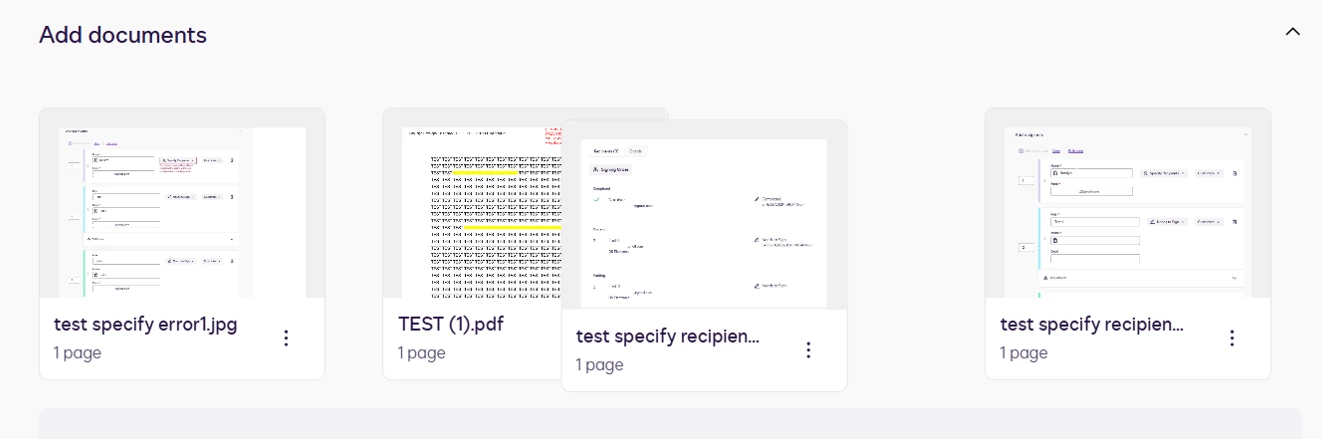
why am i not able to change the order of the documents in my docusign envelope by clicking on the thumbnail image and dragging it. This worked 2 days ago, but no longer works. 7/17/26 Thank you
Thank you for your prompt response and for providing additional information.
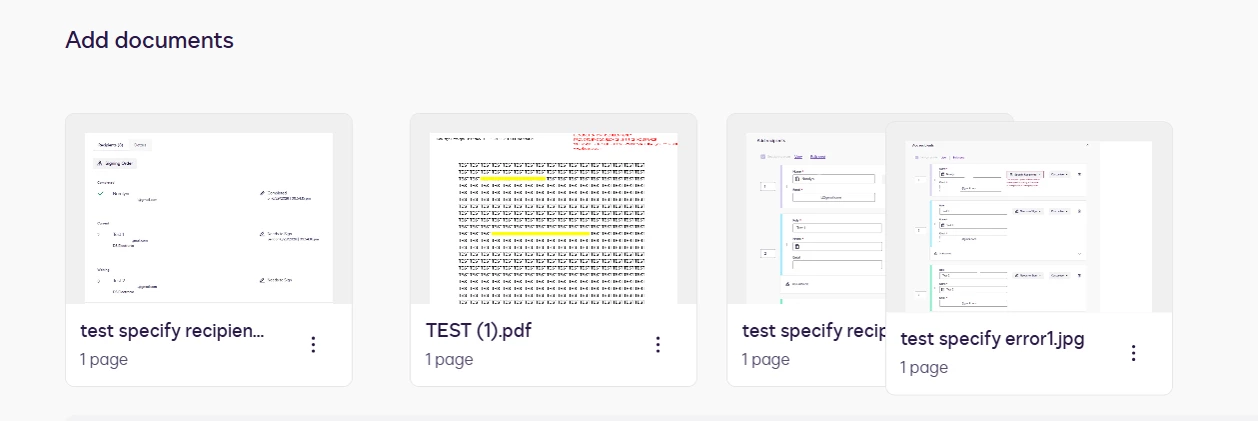
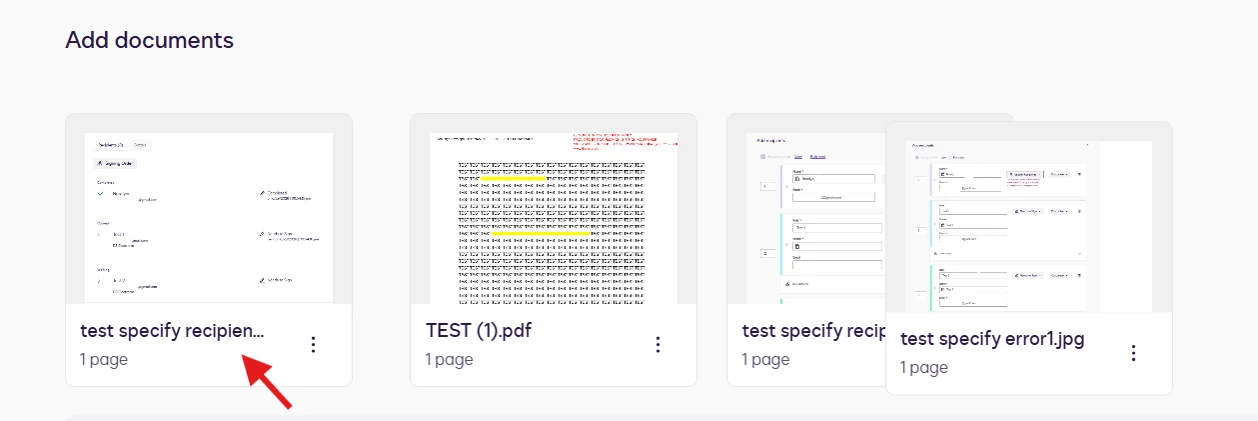
I have replicated the issue on my end, and I have not encountered the same behavior. The drag-and-drop is working as expected. Please refer to the image below for reference.
Initially, I hover and click the mouse in the middle, where the document is visible. I wasn’t able to drag, but I tried clicking the space where the document filename is, and I was able to move and reorder the document.
Could you please help me check whether it’ll work on your end by following the same steps?
We actually have two ways on how to reorder documents.
From the Prepare view - In the Add documents section, click anywhere on the thumbnail image of the document you want to move, and drag the file into the desired position.
From the Add Fields view - Select ACTIONS > Edit Documents, and then drag and reorder the files
If the issue has not been resolved with the information provided, your best next step is to open a Support case so our tech team can take a closer look. 👉 Open a support case
I look forward to hearing back from you.
Best regards,
Noralynn | Docusign Community Moderator
If this helped. Feel free to Like👍and click "Best Answer."
Thank you for engaging with the Docusign Community. We are pleased to have you here.
I’m sorry to hear about the recent experience you had with changing the order of the documents in your envelope. I’ll be glad to help you with this.
Drag-and-drop reordering of the documents should still be available when preparing an envelope. If it was working previously and has suddenly encountered an issue, this could be related to a temporary browser issue.
As a first step, try refreshing the page, clearing the browser’s cache, or using a different browser, such as incognito or a private window. If the issue persists, please provide a screenshot showing how the issue occurs and any related information that will help identify the root cause.
We also have to consider if the envelope has been sent, the order of the documents cannot be changed, especially if one of the recipients has already signed. Modifying the document order would affect the integrity of the completed signatures. With that, you need to void the envelope if necessary and send a new one with the documents arranged in the desired order.
Let us know if the situation is different, and I’ll be happy to help.
Clearing Cache, cookies everything is not working. Either on my default browser, a different browser nor in incognito mode. Any other suggestions? thanks
This is only at the stage of preparing a new envelope, not after an envelope has been viewed or signed. Documents are dragged in to the envelope and once there, there is no ability to move them. When hovering over the documents a blue X in the upper RH corner appears. I can only delete them
Again, I have cleared cache, cookies, utilized incognito mode, a different browser and restarted my computer multiple times. I have other colleagues experiencing the same issue. thank you for your assistance.
I am having the same exact issues starting last Thursday 7/16 and have been trying to get help since. It was working just fine and I was reordering docs in numerous packages and then it suddenly stopped. I have several packages that are now overdue to be sent out and I am still waiting to get them in the right order with support help. I tried everything that was suggested and seeing someone else having the same issues seems to be an internal issue multiple people are now experiencing?
Thank you for your prompt response and for providing additional information.
I have replicated the issue on my end, and I have not encountered the same behavior. The drag-and-drop is working as expected. Please refer to the image below for reference.
Initially, I hover and click the mouse in the middle, where the document is visible. I wasn’t able to drag, but I tried clicking the space where the document filename is, and I was able to move and reorder the document.
Could you please help me check whether it’ll work on your end by following the same steps?
We actually have two ways on how to reorder documents.
From the Prepare view - In the Add documents section, click anywhere on the thumbnail image of the document you want to move, and drag the file into the desired position.
From the Add Fields view - Select ACTIONS > Edit Documents, and then drag and reorder the files
If the issue has not been resolved with the information provided, your best next step is to open a Support case so our tech team can take a closer look. 👉 Open a support case
I look forward to hearing back from you.
Best regards,
Noralynn | Docusign Community Moderator
If this helped. Feel free to Like👍and click "Best Answer."
Also I just want to add that that has never been the case before to have to click on file name and drag, this is new but as long as it’s working then should be good to go.
I agree with you, and we sincerely apologize for the inconvenience this issue has caused you. I am still checking if there were any recent updates to our Docusign interface, especially on the reordering of the documents, so far no documentation has been released yet.
Feel free to check and monitor for any updates or release notes from Docusign through this link: New and Enhanced Features
Feel free to Like 👍and click the “Best Answer ✅” button below the post. That helps others in the Community find trusted answers faster.
You can login or register as either a Docusign customer or developer. If you don’t already have a Docusign customer or developer account, you can create one for free when registering.
You can login or register as either a Docusign customer or developer. If you don’t already have a Docusign customer or developer account, you can create one for free when registering.
 Back to Docusign.com