Active Voice
August 7, 2026
Solved

Understanding Document Visibility options

  • August 7, 2026
  • 4 replies
  • 44 views

Hi,

I am working in a demo account as an administrator and am trying to understand the available Document Visibility options.

I tested the Sender can set “Must sign to view, unless a member of sending account” setting and understand that this model restricts document visibility based on whether a recipient is required to sign (with the account member exception). In this test, I set the visibility rule on a template for an uploaded document.

However, our business requirement is different. We have scenarios where recipients on the same envelope need different levels of access:

  • Some recipients need to see all documents uploaded to the envelope, regardless of whether they are required to sign.

  • Other recipients should not be able to see certain uploaded documents.

  • Visibility should be controlled at the document/recipient level, not based only on whether someone is a signer.

For example:

  • Document A → Recipient 1 can view, Recipient 2 cannot view
  • Document B → Recipient 2 can view, Recipient 1 cannot view

The goal is for the sender to define who can view each document regardless of whether the recipient is required to sign.

In my demo account, the available Document Visibility options appear to be limited to:

  • Sender can set “Must sign to view, unless a member of sending account”
  • Sender can set “Must sign to view unless sender”
  • Sender can set “must sign to view, unless a member of sending account”
  • Sender can set “must sign to view, unless sender”

Can you please confirm:

  1. Does DocuSign have a feature called Document Visibility Matrix or recipient-level document visibility?

  2. If available, how is it enabled or configured?

  3. If it is not available in this demo account, what feature entitlement or account setting is required?

Additionally, I need to understand how this functionality applies to documents uploaded during envelope creation (not only documents that originate from templates).

For example:

  • If a sender uploads an internal PDF at send time, can the sender assign visibility so only specific recipients can view it?

  • Can uploaded documents follow the same recipient/document visibility rules as template documents?

  • Are there limitations or differences between uploaded documents and template documents?

Thank you,


Maggie


Best answer by Jenny.Martin

Hello Maggie,

Thanks for reaching out here in the Docusign Community—great to have you here! 

Yes, this is doable, and it applies to both template and manually uploaded documents.

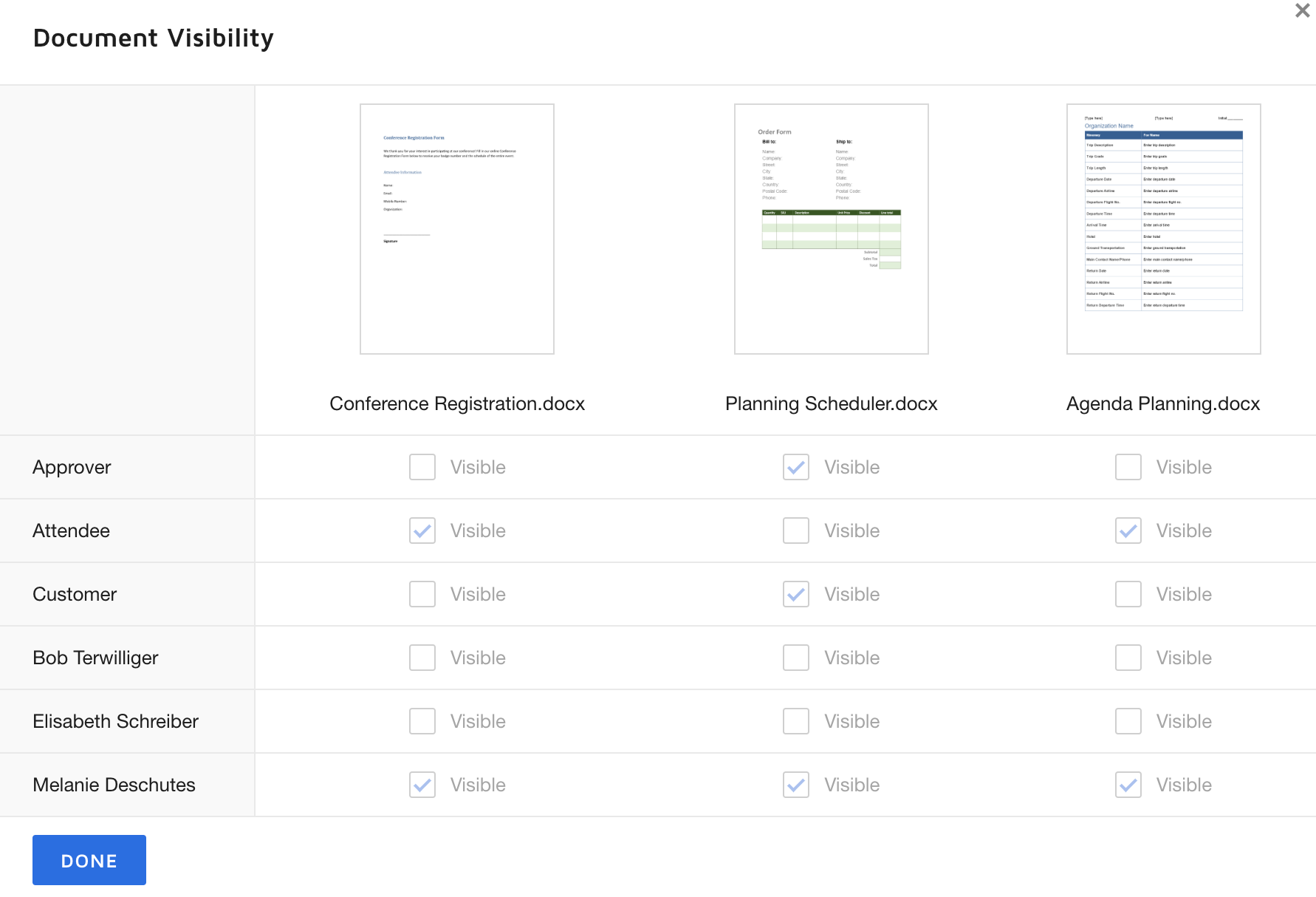
Document Visibility isn't a separate "matrix" feature. It's the per-document, per-recipient grid inside the "Sender can set" options you already found. The one rule to keep in mind: if a recipient has a field/tab on a document, they'll always be able to see it; visibility can only be restricted for recipients who have no tab on that specific document.

To set it up:

  1. In Admin > Sending Settings > Document Visibility, make sure a "Sender can set…" option is selected (not "Must sign to view…", that's account-wide with no flexibility). 
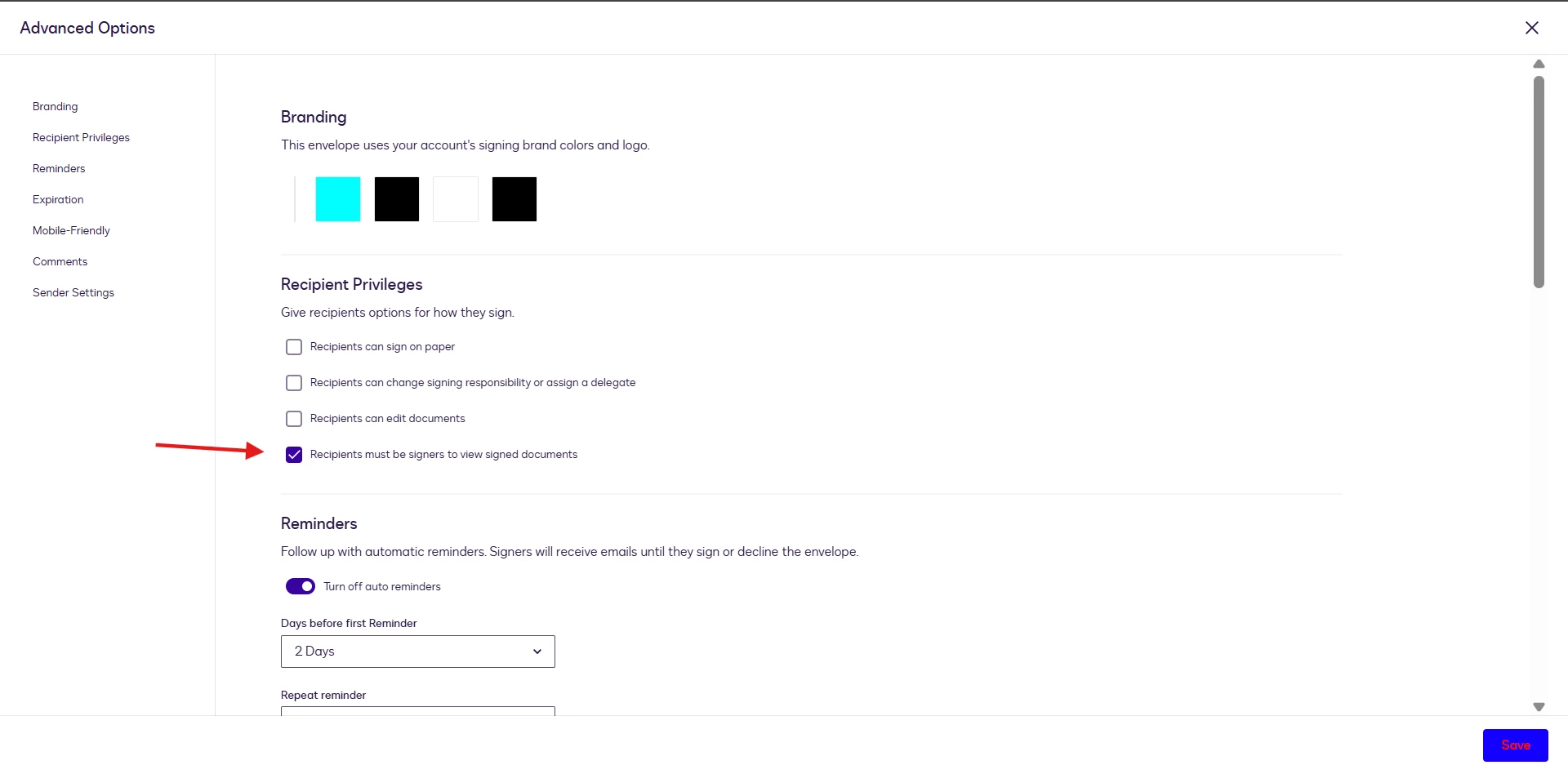
  2. In your envelope or template, go to Advanced Options > Recipient Privileges and turn on document visibility by selecting “Recipients must be signers to view signed documents” > Save 


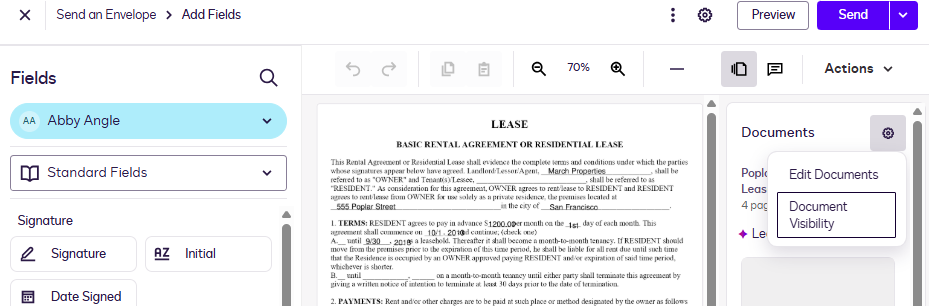
    3. Select the Thumbnails icon to open the Documents pane and then select the Document settings gear and choose Document Visibility:

docvisgear.png?token=eyJhbGciOiJIUzI1NiIsInR5cCI6IkpXVCJ9.eyJjdXN0b21lciI6ImRvY3VzaWduX3Byb2R1Y3Rpb24iLCJleHAiOjE3ODYzODAwNTgsInNoZWFmIjoiZ2JvMTY0MzMzMjE5Nzk4MCJ9.nlek4vFA45dVQFXdJLPu68Sf3c8jbh9N6CGDuAW_HFc&_LANG=enus

    4. The visibility control table opens:

docvistable.png?token=eyJhbGciOiJIUzI1NiIsInR5cCI6IkpXVCJ9.eyJjdXN0b21lciI6ImRvY3VzaWduX3Byb2R1Y3Rpb24iLCJleHAiOjE3ODYzODAwNTgsInNoZWFmIjoiZ2JvMTY0MzMzMjE5Nzk4MCJ9.nlek4vFA45dVQFXdJLPu68Sf3c8jbh9N6CGDuAW_HFc&_LANG=enus


Here’s a helpful resource with more details: 👉 Set Document Visibility 

On uploaded documents: Same rules apply, whether a document comes from a template or is uploaded at send time, it's treated the same way once it's in the envelope. No separate entitlement needed there.

The sender can always see every document, and visibility works at the whole-document level (not per page).
👉 Some Things To Know About Document Visibility


Hope this helps! If you get stuck or have more questions, we’re here.


Best Regards,
Jenny | Docusign Community Moderator
If this helped, feel free to mark it as "Best Answer" so others can find it too!


4 replies

Community Moderator
August 10, 2026

Hello Maggie,

Thanks for reaching out here in the Docusign Community—great to have you here! 

Yes, this is doable, and it applies to both template and manually uploaded documents.

Document Visibility isn't a separate "matrix" feature. It's the per-document, per-recipient grid inside the "Sender can set" options you already found. The one rule to keep in mind: if a recipient has a field/tab on a document, they'll always be able to see it; visibility can only be restricted for recipients who have no tab on that specific document.

To set it up:

  1. In Admin > Sending Settings > Document Visibility, make sure a "Sender can set…" option is selected (not "Must sign to view…", that's account-wide with no flexibility). 
  2. In your envelope or template, go to Advanced Options > Recipient Privileges and turn on document visibility by selecting “Recipients must be signers to view signed documents” > Save 


    3. Select the Thumbnails icon to open the Documents pane and then select the Document settings gear and choose Document Visibility:

docvisgear.png?token=eyJhbGciOiJIUzI1NiIsInR5cCI6IkpXVCJ9.eyJjdXN0b21lciI6ImRvY3VzaWduX3Byb2R1Y3Rpb24iLCJleHAiOjE3ODYzODAwNTgsInNoZWFmIjoiZ2JvMTY0MzMzMjE5Nzk4MCJ9.nlek4vFA45dVQFXdJLPu68Sf3c8jbh9N6CGDuAW_HFc&_LANG=enus

    4. The visibility control table opens:

docvistable.png?token=eyJhbGciOiJIUzI1NiIsInR5cCI6IkpXVCJ9.eyJjdXN0b21lciI6ImRvY3VzaWduX3Byb2R1Y3Rpb24iLCJleHAiOjE3ODYzODAwNTgsInNoZWFmIjoiZ2JvMTY0MzMzMjE5Nzk4MCJ9.nlek4vFA45dVQFXdJLPu68Sf3c8jbh9N6CGDuAW_HFc&_LANG=enus


Here’s a helpful resource with more details: 👉 Set Document Visibility 

On uploaded documents: Same rules apply, whether a document comes from a template or is uploaded at send time, it's treated the same way once it's in the envelope. No separate entitlement needed there.

The sender can always see every document, and visibility works at the whole-document level (not per page).
👉 Some Things To Know About Document Visibility


Hope this helps! If you get stuck or have more questions, we’re here.


Best Regards,
Jenny | Docusign Community Moderator
If this helped, feel free to mark it as "Best Answer" so others can find it too!


Community Moderator
August 17, 2026

Hello ​@maggie.gallotti,

I hope you’re doing well. I’m following up to see if the information shared above was helpful. If it added clarity or answered your question, marking it as “Best Answer” ✅ will highlight it for others in the community. If you still need more support, we’re here to help.


Best Regards,

Jenny | Docusign Community Moderator

Active Voice
August 17, 2026

Thank you Jenny,  This is great. Thanks for taking the time to do this.

Community Moderator
August 18, 2026

@maggie.gallotti, glad to help! If you have any other questions or need help in the future, feel free to reach out.


Jenny | Docusign Community Moderator