Since a while we can only go back the Last 12 months to search for a sent envelope. To find a document that was sent before, the workaround with the report and paste the envelope ID is very time consuming and not customer friendly.
Why was the search ‘All time’ removed? If it was for performance reasons, I think a solution has to be found.
Thank you for engaging with the Docusign Community. We are pleased to have you here.
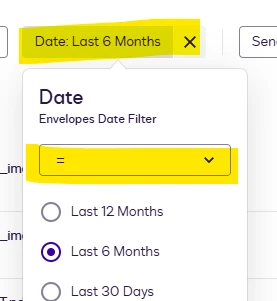
We understand your concern regarding the “All time” option being removed and the inability to properly search for envelopes sent more than 12 months ago. We apologize for the inconvenience, and I’ll be glad to help you with this. This is part of the update from the New and Enhanced Features: April 2026. However, if you would like to make it like an “All time”, you can simply click the X on the date filter.
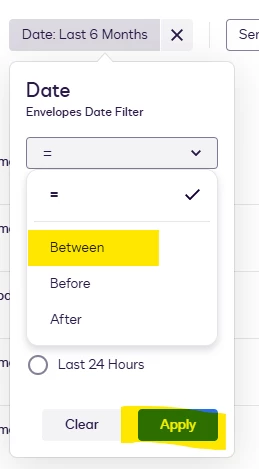
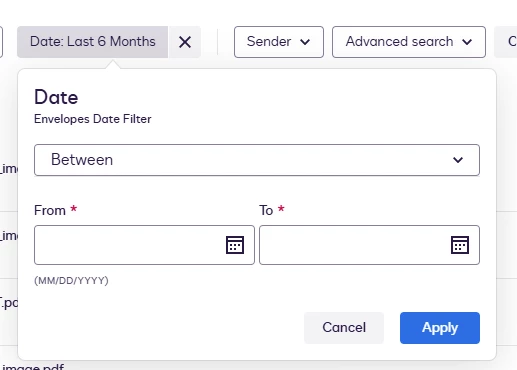
Also, you can use the “Custom” option to manually select the start and end date. Please refer to the image below for guidance.
If the X button is not visible, click the dropdown arrow and select “Last 6 Months” to make the X button appear again.
I hope the information provided is helpful. Feel free to click the “Best Answer ✅” button below the post. That helps others in the Community find trusted answers faster.
Thank you for engaging with the Docusign Community. We are pleased to have you here.
We understand your concern regarding the “All time” option being removed and the inability to properly search for envelopes sent more than 12 months ago. We apologize for the inconvenience, and I’ll be glad to help you with this. This is part of the update from the New and Enhanced Features: April 2026. However, if you would like to make it like an “All time”, you can simply click the X on the date filter.
Also, you can use the “Custom” option to manually select the start and end date. Please refer to the image below for guidance.
If the X button is not visible, click the dropdown arrow and select “Last 6 Months” to make the X button appear again.
I hope the information provided is helpful. Feel free to click the “Best Answer ✅” button below the post. That helps others in the Community find trusted answers faster.
You can login or register as either a Docusign customer or developer. If you don’t already have a Docusign customer or developer account, you can create one for free when registering.
You can login or register as either a Docusign customer or developer. If you don’t already have a Docusign customer or developer account, you can create one for free when registering.
 Back to Docusign.com