Can i make it so that i can add documents but hidden until the main doc is signed. I am a broker and i want the client to sign the NDA before financials are released?
Thank you for engaging with the Docusign Community. We are pleased to have you here.
We understand your concern about the envelope setup, where the signer will need to sign the NDA first, and then the other documents will be visible. We apologize for the inconvenience, and I’ll be glad to assist you with this.
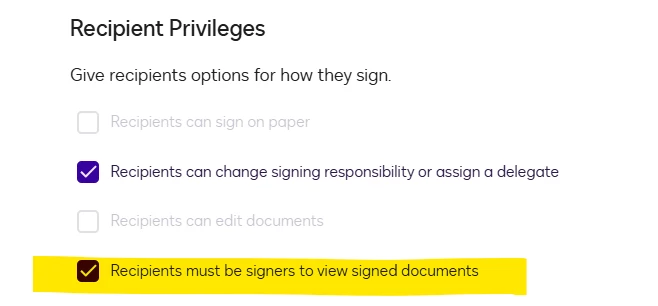
Docusign offers a Document Visibility feature where you can control which recipients can view specific documents within an envelope. This should be enabled in your account settings by an account administrator. Once enabled, this can be configured at the envelope or template level. The sender can set visibility permissions for individual documents by navigating to Advanced Options > Recipient Privileges. Please take a look at the image below for guidance.
Based on your scenario, you can upload multiple documents and add recipients with a signing order.
Sample recipient order:
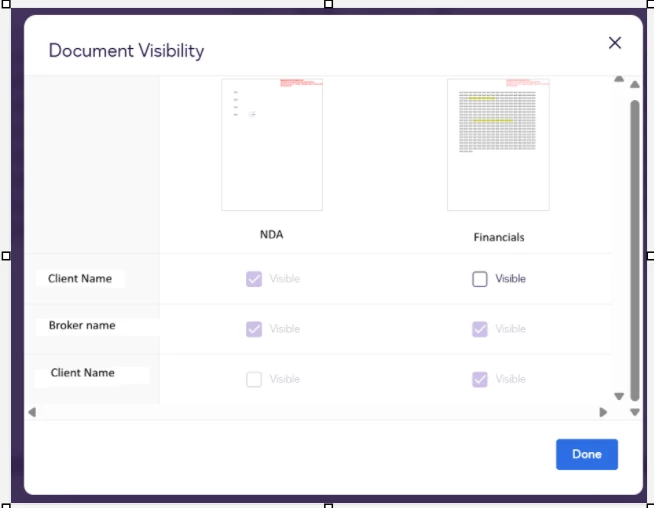
1st recipient (Client) - once the client reviews and signs the NDA, the 2nd recipient (Broker) with “Allow to edit” permission will receive an email notification to review and add documents, or to edit other documents if necessary.
Once done, the 3rd recipient (the same client) will receive another email notification to review the other documents (financials) and sign for completion.
To set up Document Visibility, you need to assign fields indicating which documents the recipient should see or hide. You can uncheck “Visible” to hide it from a specific recipient.
Thank you for engaging with the Docusign Community. We are pleased to have you here.
We understand your concern about the envelope setup, where the signer will need to sign the NDA first, and then the other documents will be visible. We apologize for the inconvenience, and I’ll be glad to assist you with this.
Docusign offers a Document Visibility feature where you can control which recipients can view specific documents within an envelope. This should be enabled in your account settings by an account administrator. Once enabled, this can be configured at the envelope or template level. The sender can set visibility permissions for individual documents by navigating to Advanced Options > Recipient Privileges. Please take a look at the image below for guidance.
Based on your scenario, you can upload multiple documents and add recipients with a signing order.
Sample recipient order:
1st recipient (Client) - once the client reviews and signs the NDA, the 2nd recipient (Broker) with “Allow to edit” permission will receive an email notification to review and add documents, or to edit other documents if necessary.
Once done, the 3rd recipient (the same client) will receive another email notification to review the other documents (financials) and sign for completion.
To set up Document Visibility, you need to assign fields indicating which documents the recipient should see or hide. You can uncheck “Visible” to hide it from a specific recipient.
You can login or register as either a Docusign customer or developer. If you don’t already have a Docusign customer or developer account, you can create one for free when registering.
You can login or register as either a Docusign customer or developer. If you don’t already have a Docusign customer or developer account, you can create one for free when registering.
 Back to Docusign.com