Newcomer
September 8, 2026
Question

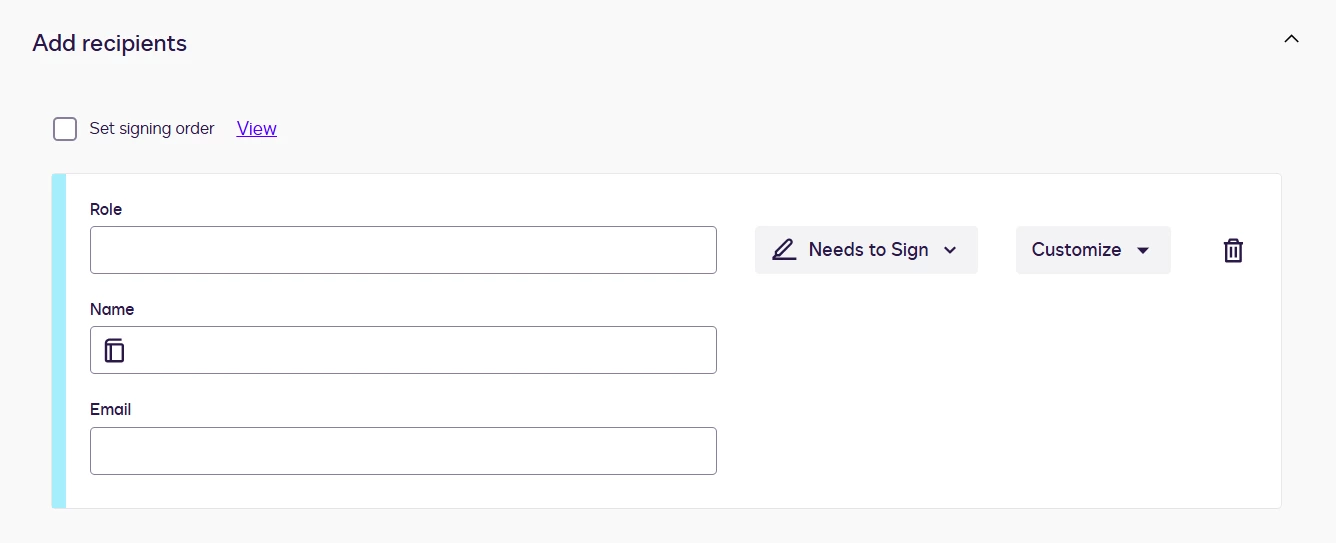
Option to remove Role on Recipient signing section on new template

  • September 8, 2026
  • 1 reply
  • 4 views

I am creating a new Template for an Envelope. Under “Add Recipients”, it has automatically added the signer section with Name and Email but it has also added a line for Role - how do I remove the Role?


1 reply

Community Moderator
September 8, 2026

Hello ​@MeganB88 
Thank you for reaching out, and welcome to the Docusign Community! We appreciate your question and assure you that we are fully committed to providing you with the best service possible. 

If you copy an existing template and edit it to create a new one, it will also copy all the details from the original. Have you tried clicking the delete button next to “Customize” to add recipients and show the standard Name and Email?


For your reference, here are relevant articles you may check.
Save as Template
Create Templates

If you found the response to be a useful solution to your question, please “like” and mark it as the best answer by clicking “Select as Best” to make it easier for other users to find. Thank you!

Sincerely,

Ma. Cassandra | Docusign Community Moderator
If this helped, feel free to Like👍and click "Best Answer"

