Thanks for reaching out to the DocuSign Community. It's great to have you here!
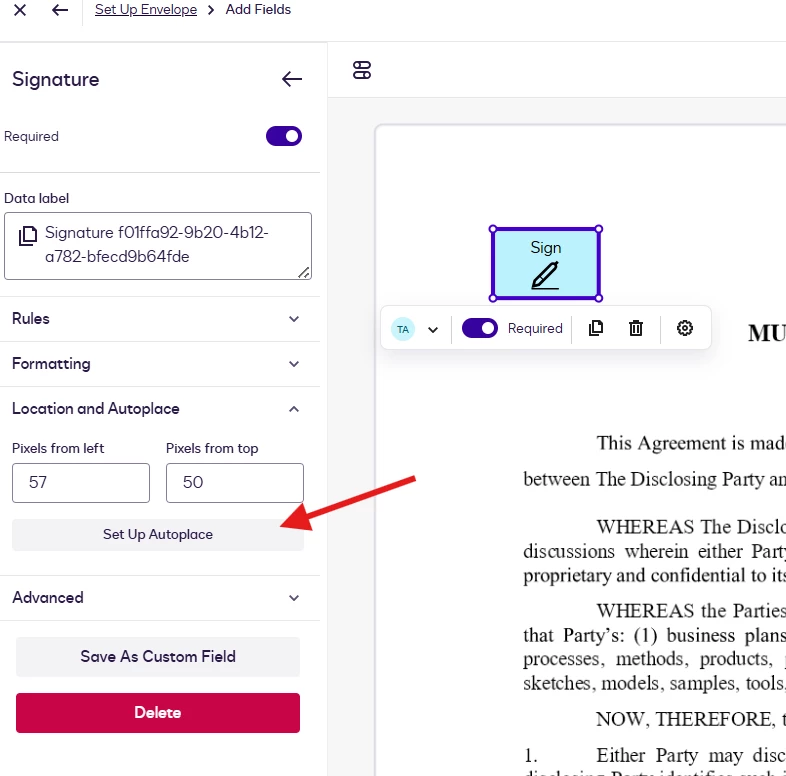
If your document contains recurring text that appears in multiple locations, you can use AutoPlace to automatically add a signature field wherever that text is found. This eliminates the need to manually place signature fields on each page.
To configure AutoPlace:
Add a Signature field to the document.
Click the signature field to open its properties.
Select Location and AutoPlace.
Configure the AutoPlace using the recurring text in your document.
Once configured, the signature field will automatically be placed at every matching location throughout the document.
I hope you find this helpful. If you believe this response effectively addresses your question, please mark it as “Best Answer” to help other users with similar questions locate it more easily.
Should you require any additional assistance, feel free to reach out. Thank you!
Thanks for reaching out to the DocuSign Community. It's great to have you here!
If your document contains recurring text that appears in multiple locations, you can use AutoPlace to automatically add a signature field wherever that text is found. This eliminates the need to manually place signature fields on each page.
To configure AutoPlace:
Add a Signature field to the document.
Click the signature field to open its properties.
Select Location and AutoPlace.
Configure the AutoPlace using the recurring text in your document.
Once configured, the signature field will automatically be placed at every matching location throughout the document.
I hope you find this helpful. If you believe this response effectively addresses your question, please mark it as “Best Answer” to help other users with similar questions locate it more easily.
Should you require any additional assistance, feel free to reach out. Thank you!
We trust that all is well. We’d like to know if the suggested solution was helpful. If yes, we would greatly appreciate it if you could mark it as "Best Answer", to help other community members find trusted answers.
Let us know if you need further assistance. We’re here for you!
You can login or register as either a Docusign customer or developer. If you don’t already have a Docusign customer or developer account, you can create one for free when registering.
You can login or register as either a Docusign customer or developer. If you don’t already have a Docusign customer or developer account, you can create one for free when registering.
 Back to Docusign.com