Hello @Ksanterre,
Thanks for reaching out, and welcome to the Docusign Community!
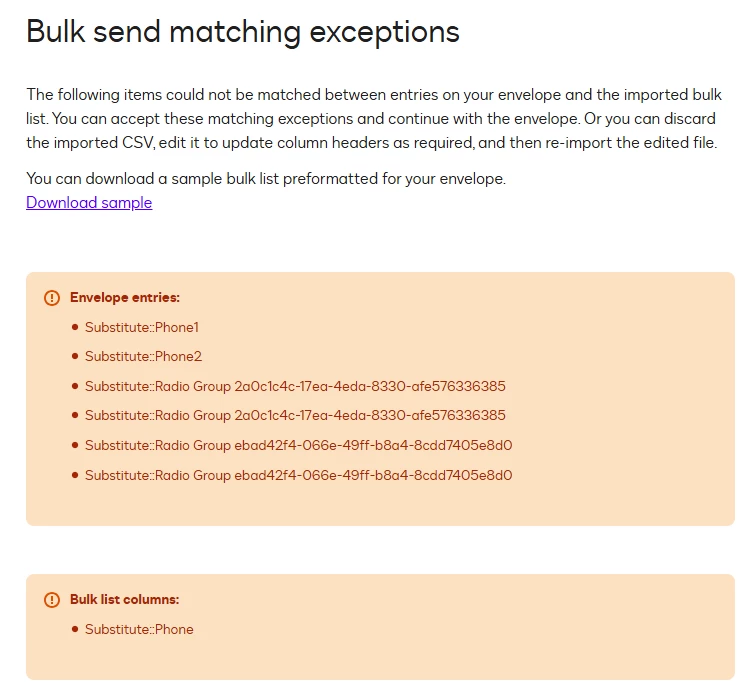
From what you’ve shown, the issue is that the names in your template don’t match the headers in your spreadsheet/CSV file.
Your template has fields like Substitute: Phone1, Substitute: Phone2, and those long auto‑generated IDs for radio groups. While your CSV only has a column named 'Substitute: Phone’. The system expects the names to line up exactly, character by character. If they don’t, it throws the “matching exceptions” error.
So the issue is:
-
The template is looking for Phone1 and Phone2, but the CSV only has Phone.
-
The radio button groups have long system‑generated names, but your CSV doesn’t have matching headers for those.
To fix this, you’ll need to either:
-
Rename the data label of your fields in your template so they match the CSV headers exactly, or
-
Update the CSV file headers so they match the template’s Data Labels exactly.
The easiest way forward is usually to clean up the Data Labels in your template (short, clear names like Phone1, Phone2, OptionA ..) and then re‑download the sample CSV. That sample shows you the exact headers the system expects, and you can copy them into your file.
I hope this helps. Should you require additional assistance, feel free to reach out.
Best Regards,
Jenny | Docusign Community Moderator
If this helped, like 👍and mark it as “Best Answer”
 Back to Docusign.com