Thank you for reaching out here in the Docusign Community! Great to have you here.
I understand that you need the date and time to appear directly on each document where the customer signs, rather than just on the summary. I am happy to help you set this up.
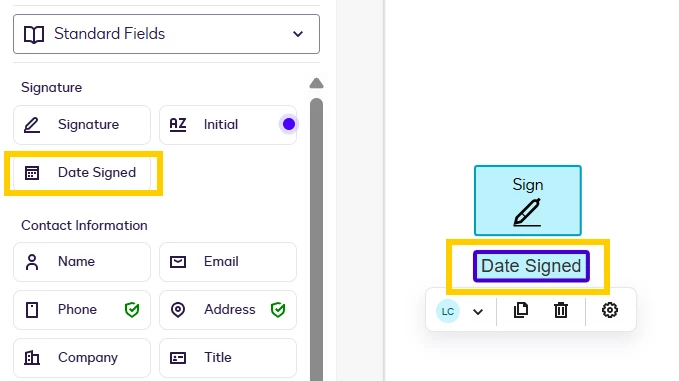
To show the specific date of signing on your documents, you can use the Date signed field. This is a standard field that you can simply drag and drop from the left-hand menu and place right beside each signature field.
Date Signed field
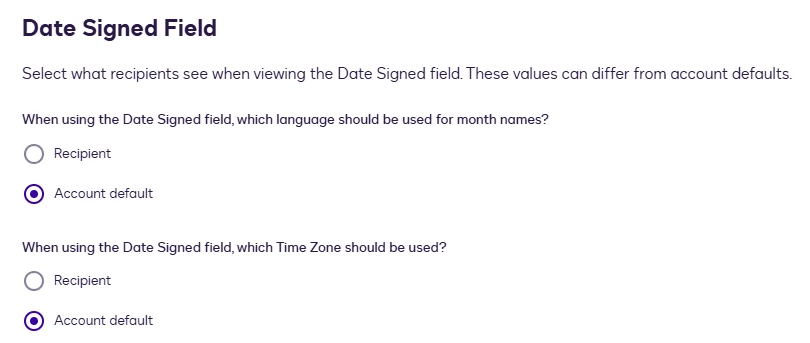
When the customer signs the document, the Date Signed field will automatically populate with the date and time of the signing session. However, an Admin of the account can adjust the date and time displayed in the field, whether they want it to align with the signer’s settings or the account default.
To edit the Date signed field, your admin can follow these steps: Go to the Admin tab > On the left panel, go to Regional Settings > Configure the setting.
By placing this field on each document in your envelope, you will ensure that every signature is accompanied by its own timestamp.
Please let me know if you have any questions, I’m here to help.
Best Regards,
Luke | Docusign Community Moderator
If this helped, feel free to Like👍and click "Best Answer."
Thank you for reaching out here in the Docusign Community! Great to have you here.
I understand that you need the date and time to appear directly on each document where the customer signs, rather than just on the summary. I am happy to help you set this up.
To show the specific date of signing on your documents, you can use the Date signed field. This is a standard field that you can simply drag and drop from the left-hand menu and place right beside each signature field.
Date Signed field
When the customer signs the document, the Date Signed field will automatically populate with the date and time of the signing session. However, an Admin of the account can adjust the date and time displayed in the field, whether they want it to align with the signer’s settings or the account default.
To edit the Date signed field, your admin can follow these steps: Go to the Admin tab > On the left panel, go to Regional Settings > Configure the setting.
By placing this field on each document in your envelope, you will ensure that every signature is accompanied by its own timestamp.
Please let me know if you have any questions, I’m here to help.
Best Regards,
Luke | Docusign Community Moderator
If this helped, feel free to Like👍and click "Best Answer."
I hope you are doing well. I’m here to check whether you were able to resolve this matter or if there’s anything else we can help you with. Don’t hesitate to let us know.
Thank you, and have a great day ahead!
Best Regards,
Luke | Docusign Community Moderator If this helped, feel free to Like👍and click "Best Answer."
You can login or register as either a Docusign customer or developer. If you don’t already have a Docusign customer or developer account, you can create one for free when registering.
You can login or register as either a Docusign customer or developer. If you don’t already have a Docusign customer or developer account, you can create one for free when registering.
 Back to Docusign.com