Is is possible to use Docusign for purposes of e-voting ballot? I tried using check box Group with “exactly 1” as a validation but did not work”. Tried a radio button with only one place for voters to select and it did not give me the number of voters. Should my approach be set up each voter with its own items to vote and sign it?
We appreciate you reaching out to the Docusign Community and are delighted to have you join us.
We apologize that you’re having difficulty using the checkboxes with validation. Let me help you with this and provide the necessary information.
To better assist, please verify how you are trying to set up the checkboxes. Please try the following steps and see if it works.
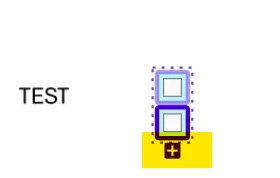
Add a checkbox field and click on the + icon to add more checkboxes. This will allow you to create a checkbox group.
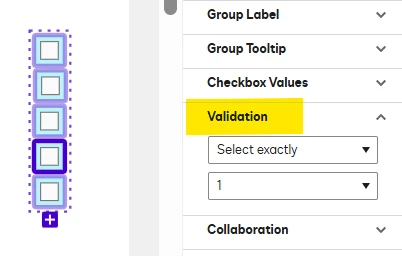
Once done, click the checkbox group and configure your preferred validation.
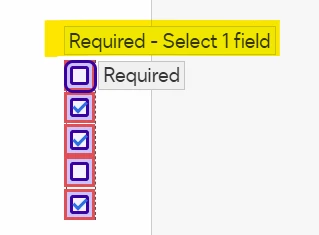
When the recipient receives the document, a tooltip will appear showing the number of required fields they need to select. If the recipient selects multiple checkboxes, they will encounter an error and will not be able to finish or complete the envelope.
You need to send a separate envelope to each voter to gather the total number of votes.
Docusign also offers a Web Forms feature that lets you create a shareable online form by generating a URL or embedding the form on your website. It collects information from recipients and automatically turns it into a Docusign envelope for signing. Please note that each recipient who accesses the URL counts towards your envelope allowance. Web form data results can be viewed and downloaded in CSV format.
If the information provided addresses your concern, could you click the “Best Answer ✅” button below the post? That helps others in the Community find trusted answers faster.
We appreciate you reaching out to the Docusign Community and are delighted to have you join us.
We apologize that you’re having difficulty using the checkboxes with validation. Let me help you with this and provide the necessary information.
To better assist, please verify how you are trying to set up the checkboxes. Please try the following steps and see if it works.
Add a checkbox field and click on the + icon to add more checkboxes. This will allow you to create a checkbox group.
Once done, click the checkbox group and configure your preferred validation.
When the recipient receives the document, a tooltip will appear showing the number of required fields they need to select. If the recipient selects multiple checkboxes, they will encounter an error and will not be able to finish or complete the envelope.
You need to send a separate envelope to each voter to gather the total number of votes.
Docusign also offers a Web Forms feature that lets you create a shareable online form by generating a URL or embedding the form on your website. It collects information from recipients and automatically turns it into a Docusign envelope for signing. Please note that each recipient who accesses the URL counts towards your envelope allowance. Web form data results can be viewed and downloaded in CSV format.
If the information provided addresses your concern, could you click the “Best Answer ✅” button below the post? That helps others in the Community find trusted answers faster.
I missed your email response and was not able to use your guidance's above. Though I have a follow-up with Check Box feature with a validation of “Exactly 1”, can the signer select more than one?
If you set the validation of “Exactly 1”, the signer will not be able to select more than one. They will encounter an error and will not be able to complete the signing process.
You can use the “Select a range” instead, and you will have an option to set the minimum and maximum number of checkboxes the signer can select. As long as it is within the range, the signer can then proceed and finish the envelope.
You can login or register as either a Docusign customer or developer. If you don’t already have a Docusign customer or developer account, you can create one for free when registering.
You can login or register as either a Docusign customer or developer. If you don’t already have a Docusign customer or developer account, you can create one for free when registering.
 Back to Docusign.com