I’m trying to set up a envelope that requires a wet signature from one of the signers. I have done a test send and the recipient does not have the option to Print and Sign. Is there any settings that we need to activate? or any way to require a wet signature on a document via DocuSign?
The “Print and Sign” functionality is what can be used to get a wet signature.
It may not be available depending on the actual settings on the envelope, e.g. the signature type, which does not allow the “Print and Sign” option to be present.
Can you share more details on how the envelope is configured? We may be able to pinpoint the feature which may be preventing this option.
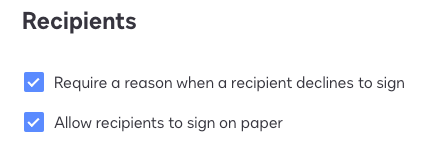
I assume that you enabled under Sending settings “Allow recipients to sign on paper”? Without this the “Print and Sign” feature will is disabled for the account and explains the behaviour.
"Select as Best" below if you find my answer is a valid solution to your issue and mark it as resolved.
The “Print and Sign” functionality is what can be used to get a wet signature.
It may not be available depending on the actual settings on the envelope, e.g. the signature type, which does not allow the “Print and Sign” option to be present.
Can you share more details on how the envelope is configured? We may be able to pinpoint the feature which may be preventing this option.
I assume that you enabled under Sending settings “Allow recipients to sign on paper”? Without this the “Print and Sign” feature will is disabled for the account and explains the behaviour.
Translate
"Select as Best" below if you find my answer is a valid solution to your issue and mark it as resolved.
Welcome to the DocuSign Community and University! Your feedback is immensely appreciated. If this answer resolves your issue, please feel free to give it a Like and mark it as the "Best Answer". This helps others in the community find the information they need. Visit us at http://dsucustomers.docusign.com for more resources and support.
DocuSign Support can assist in enabling the missing setting in your admin dashboard. To do so, please create a case and have a Support Expert look closely at your setup.
https://support.docusign.com/en/contactSupport
If you cannot open the case on the same page, you should scroll down to More Support Options and select "I can't reset my password or don't have an account." you will have the option of filling out the form or calling Support.
Please don't hesitate to let me know if you have any other questions or concerns and I will address them as soon as possible.
Best regards,
Alejandro R. | Docusign Community Moderator
Please click "Best Answer" below if you find my reply to be a valid solution to your issue!
You can login or register as either a Docusign customer or developer. If you don’t already have a Docusign customer or developer account, you can create one for free when registering.
You can login or register as either a Docusign customer or developer. If you don’t already have a Docusign customer or developer account, you can create one for free when registering.
 Back to Docusign.com