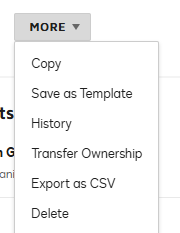
For verifying the user who void the envelop, you should open the in “agreements” tab and click on “More” and you will see “History” where you can check all the activity of user upon the envelop.
Second you will also notify via email.
Thanks! let me know if you need further assistance.
Way to Learn | I'd love your feedback | Hit Like | Mark it Best🌈
For verifying the user who void the envelop, you should open the in “agreements” tab and click on “More” and you will see “History” where you can check all the activity of user upon the envelop.
Second you will also notify via email.
Thanks! let me know if you need further assistance.
Translate
Way to Learn | I'd love your feedback | Hit Like | Mark it Best🌈
If you found the provided response to be a useful solution to your question, please mark it as the best answer by clicking “Select as Best” to make it easier for other users to find.
Best regards,
Nathaly | Docusign Community Moderator "Select as Best" below if you find the answer a valid solution to your issue!
You can login or register as either a Docusign customer or developer. If you don’t already have a Docusign customer or developer account, you can create one for free when registering.
You can login or register as either a Docusign customer or developer. If you don’t already have a Docusign customer or developer account, you can create one for free when registering.
 Back to Docusign.com