New Voice
Aug 26, 2024 10:17 AM UTC
Solved

Unable to hide envelope ID from document.

Hi Team,
I am currently using a developer account (https://apps-d.docusign.com/) to test docusign integration using REST API: POST- https://{ServiceDomain}/restapi/{Version}/accounts/{AccountId}/envelopes to create envelope. My requirement is to hide the envelope ID from document.

I am passing envelopeIdStamping== false in request JSON but It is not working.

If I go to Sending settings in https://apps-d.docusign.com/admin/sending-settings, then the options are greyed out.
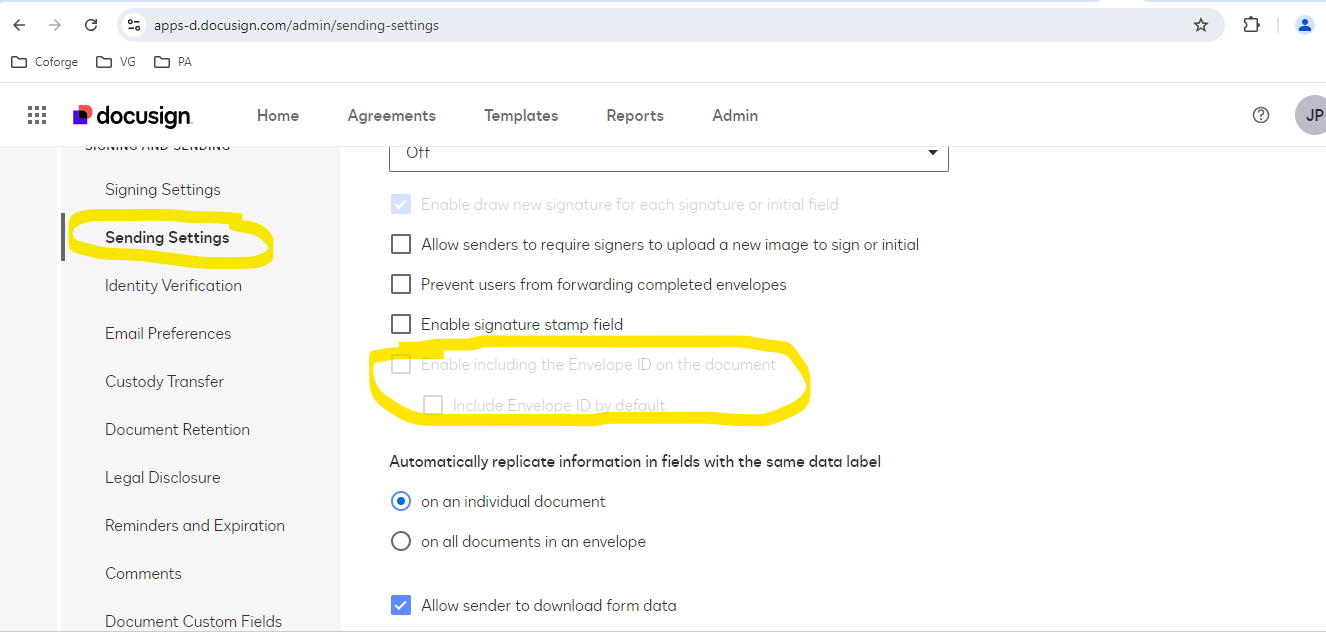
 

I saw multiple support article on this issue and found  “To include the Envelope ID on documents, the feature must be enabled by your Docusign administrator in the account Sending Settings.

But not sure how to do it. I am not sure how to connect docusign support to enable it.

 

https://support.docusign.com/s/document-item?language=en_US&rsc_301&bundleId=gbo1643332197980&topicId=erv1578456367288.html&_LANG=enus

Pawan Gangwani
Hero
Aug 26, 2024 1:22 PM UTC

Hello @Jaggu010 

 If the option is not available it could be due to your plan type, in that case please contact Customer Support to have it changed in the backend if possible: https://support.docusign.com/en/contactSupport.
 

  1. Select Open a Support Case at the top of the page.
  2. Select the Continue button beneath eSignature, Rooms, and CLM. Note: If you're a DoD customer, select DoD Customer Login.
  3. Log in using your Product credentials (email and password) and select Continue:
    1. The DocuSign Support Center requires login credentials for a Production account. The account can be a Trial account, but it must be in a Production environment (i.e., not a Demo or Sandbox environment).
    2. Have issues logging in? Try these troubleshooting steps.
  4. Select a Case Subject. Note: If you have multiple DocuSign accounts, a pop-up will appear. Select an account to continue.
  5. Select any of the resources under Need Answers Fast? that address your issue.
  6. If that doesn't answer your question, select the Add Case Details button.          
  7. Complete the case form.


    Thanks! let me know if you need any further assistance.
Way to Learn | I'd love your feedback | Hit Like | Mark it Best🌈

7 replies

Pawan Gangwani
Hero
Hero
Aug 26, 2024 1:22 PM UTC

Hello @Jaggu010 

 If the option is not available it could be due to your plan type, in that case please contact Customer Support to have it changed in the backend if possible: https://support.docusign.com/en/contactSupport.
 

  1. Select Open a Support Case at the top of the page.
  2. Select the Continue button beneath eSignature, Rooms, and CLM. Note: If you're a DoD customer, select DoD Customer Login.
  3. Log in using your Product credentials (email and password) and select Continue:
    1. The DocuSign Support Center requires login credentials for a Production account. The account can be a Trial account, but it must be in a Production environment (i.e., not a Demo or Sandbox environment).
    2. Have issues logging in? Try these troubleshooting steps.
  4. Select a Case Subject. Note: If you have multiple DocuSign accounts, a pop-up will appear. Select an account to continue.
  5. Select any of the resources under Need Answers Fast? that address your issue.
  6. If that doesn't answer your question, select the Add Case Details button.          
  7. Complete the case form.


    Thanks! let me know if you need any further assistance.
Translate
Way to Learn | I'd love your feedback | Hit Like | Mark it Best🌈
Jaggu010New VoiceAuthor
New Voice
Aug 26, 2024 2:02 PM UTC

Hi @Pawan Gangwani 
Thanks for the reply.
I am not sure what type of plan I have as I have never purchased any plan so far. 
I just tried to sign up with 30 days trial but getting below error. Is it possible to control envelope ID on document with out a production account?


Translate
Pawan Gangwani
Hero
Hero
Aug 26, 2024 2:09 PM UTC

Oh, I got it. i do not think on 30 day trail account, you can control the envelop id. 
As of the 30 days trail allow some selected feature to use, here is link for more complete guide: 30 days trial guide

Translate
Way to Learn | I'd love your feedback | Hit Like | Mark it Best🌈
Jaggu010New VoiceAuthor
New Voice
Aug 29, 2024 7:14 AM UTC

Hi @Pawan Gangwani 
Can we control envelope ID using a demo account?
can you engage your technical team to check on why the envelope ID still visible even though we are sending envelopeIdStamping== false in request JSON? as per your below REST API documentation, It should be hidden.


https://developers.docusign.com/docs/esign-rest-api/reference/envelopes/envelopes/create/?explorer=true

Translate
Docusign Employee
Sep 13, 2024 12:45 AM UTC

Hi @Jaggu010,


Thank you for following up.

Free Trial accounts will have limited access to features in eSignature. You are welcome to try most of our available services in our Demo environment for free, by creating a Demo account, here: https://www.docusign.com/developers/sandbox?postActivateUrl=https://developers.docusign.com/

Feel free to let us know if you need further assistance with this. 


Best regards,

Alejandro R. | Docusign Community Moderator  

Please click "Best Answer" below if you find my reply to be a valid solution to your issue!


Translate
New Voice
Nov 24, 2024 7:48 PM UTC

Good day.

Am facing the same issue. I cannot remove the envelope id. Am also on trial. It looks like it's a control measure from Docusign.

Could you please help me if there is a way to remove this. I want to test this functionality before I commit. At least DocuSign should communicate. 

Thank you.

Translate
Hengfeng Ge
Hero
Hero
Nov 24, 2024 10:00 PM UTC

We suggest test the features in demo account, it is full feature. You can registered it from https://account-d.docusign.com. And this feature needs be enable by support. You can create case from https://support.docusign.com.


FreeLink/甫连信息

🌍 DocuSign Partner | Partner Profile

🏆 DocuSign 2024 APAC Reseller Growth Partner of the Year

🌟 The only DocuSign Partner globally certified as both a Certified eSignature Administrator and eSignature Technical Consultant.

📊 DocuSign Community Leaderboard Top 5 contributor.

🚀 Expertise in DocuSign integrations with on-premises systems for leading enterprises across various industries.


Feel free to reach out for collaboration opportunities.

Translate
Welcome to the DocuSign Community! Your feedback is highly valued. If you find my response helpful, please give it a "Like" and consider marking it as the "Best Answer" to assist others with similar issues.