Newcomer
Nov 27, 2026 2:39 PM UTC
Question

Part 11 Invitation Error – The Target User Was Not Found

I am experiencing an issue when trying to access a document with the "Part 11 Module Enabled" notification.

Here is my situation:

  1. I initially received the document invitation without having a DocuSign account.
  2. I subsequently created a personal DocuSign account using the exact same email address as the invitation.
  3. I can successfully log in to my personal DocuSign account.
  4. However, when I access the Part 11 document invitation, I get asked to “Activate Account”.
  5. After entering my password and selecting my country/region, clicking ACTIVATE results in the following error:

"Something went wrong with the invitation – The target user was not found."
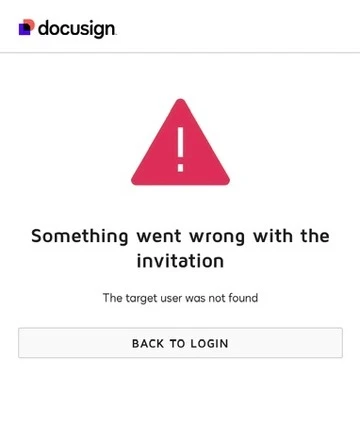
I have already used other browsers including Incognito and tried with multiple devices, but still same error appears. Also, the sender has already cancelled and resent the invitation, and still the same issue persists.

Could this issue be related to the Part 11 recipient account being incorrectly linked to an inactive or separate recipient account?

Has anyone experienced a similar issue when trying to activate a DocuSign account for a Part 11-enabled document?

I would appreciate any advice on how to resolve this issue and access the document using my existing active DocuSign account.

Thank you!

1 reply

Community Moderator
Nov 27, 2026 5:59 PM UTC

Hello ​@DocsIT 
Thank you for reaching out, and welcome to the Docusign Community! Thank you for providing those details. I appreciate the troubleshooting steps you've already taken, including trying different browsers, Incognito mode, and multiple devices. I understand how frustrating this must be, especially since you've already created an active account using the same email address as the invitation.

Since you've already exhausted the browser and device troubleshooting steps, I recommend contacting the sender and asking them to change the recipient authentication method from Account Login to SMS.

SMS authentication is a supported option for Part 11-enabled envelopes and does not require you to have a DocuSign account. Instead, you'll be asked to verify your identity using a security code sent to your registered mobile number.

For reference, you can also review documentation here: CFR Part 11 accounts

If the sender cannot change the authentication method on the existing envelope, they may need to cancel it and send a new invitation using SMS authentication.

I hope this provides an alternative way for you to access and complete the document successfully.


Sincerely,

Ma. Cassandra | Docusign Community Moderator
If this helped, feel free to Like👍and click "Best Answer"

Translate