Legacy User
Sep 17, 2019 5:09 PM UTC
Solved

Moving document folder after document has been approved

Is there a workflow step that will move the folder a document is located in? I'm attempting to move folders who's documents have completed our review process to another folder for easy access for end users.
Docusign Employee
Sep 18, 2019 5:57 AM UTC

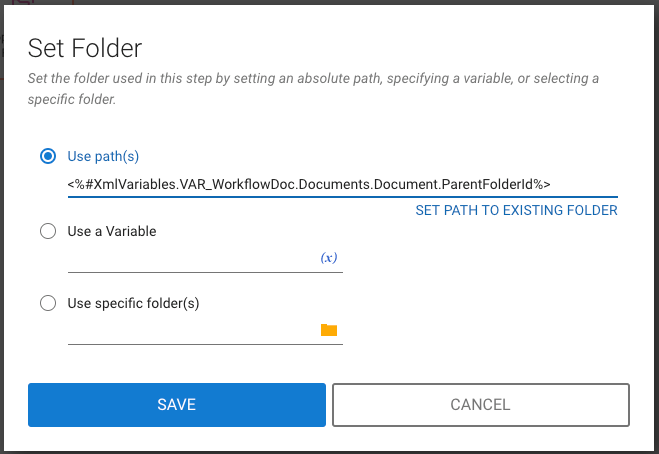
Steven, in the Folder property of the Copy or Move Folder step, click the folder icon and select the first option "Use path(s)", then type in a variable like "<%#XmlVariables.VAR_WorkflowDoc.Documents.Document.ParentFolderId%>" but replace VAR_WorkflowDoc with the name of your document variable.

Screen Shot 2019-09-18 at 1.53.41 PM

4 replies

Legacy User
Sep 17, 2019 9:31 PM UTC

There should be a step named "Copy or Move Folder" that will move a folder to a new Destination folder.

Translate
Legacy User
Sep 17, 2019 11:51 PM UTC

Thank you. Do you know how it would set the folder containing my document as the folder to move?

Translate
Docusign Employee
Sep 18, 2019 5:57 AM UTC

Steven, in the Folder property of the Copy or Move Folder step, click the folder icon and select the first option "Use path(s)", then type in a variable like "<%#XmlVariables.VAR_WorkflowDoc.Documents.Document.ParentFolderId%>" but replace VAR_WorkflowDoc with the name of your document variable.

Screen Shot 2019-09-18 at 1.53.41 PM

Translate
Legacy User
Sep 18, 2019 7:20 PM UTC

Thank you both for the assistance. I was able to successfully move my folders with the workflow step and variable information you provided.

Translate


