Legacy User
Apr 25, 2023 6:09 AM UTC
Solved

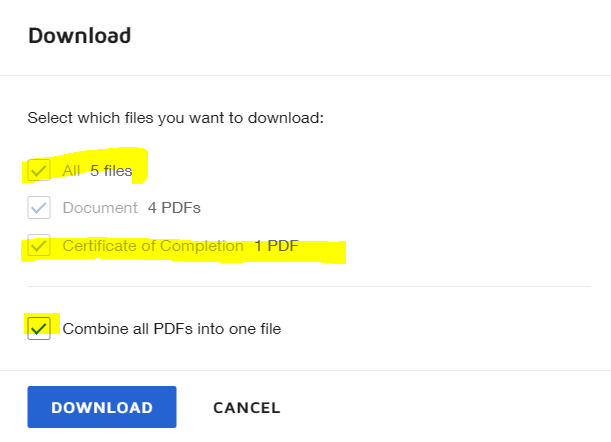
How do I "Combine all PDFs into one file" without downloading "Certificate of Completion"?

Previously, I was able to download all documents as one file WITHOUT certificate of completion.

Today, all of sudden, even if I tick download "Documents" only, the app will automatically tick the other two options ("All" and "Certificate of Completion") when I tick "Combine all PDFs into one file".

Now, if I want to Combine all PDFs as one file, I have to download together with certificate of completion. Anyone else experiencing this or able to come up with a workaround? If I tick "Combine all PDFs into one file", the app will automatically tick "All" and "Certificate of Completion" as well
Docusign Employee
Apr 25, 2023 12:04 PM UTC

Hello,

Thank you for reaching out here in the DocuSign Community.

There is a setting that controls this behavior and that can be disabled by the admin on the account, if you are not the admin, please reach out to them: https://support.docusign.com/s/document-item?bundleId=pik1583277475390&topicId=fur1583277359739.html&_LANG=enus

This setting can be disabled by going to:

  1. Settings
  2. Signing Settings
  3. Disable "Attach certificate of completion to envelope" under Envelope Delivery
  4. Save

Let us know if you need further assistance with this.

Best regards,

Nathaly | DocuSign Community Moderator

"Select as Best" below if you find the answer a valid solution to your issue!

1 reply

Docusign Employee
Apr 25, 2023 12:04 PM UTC

Hello,

Thank you for reaching out here in the DocuSign Community.

There is a setting that controls this behavior and that can be disabled by the admin on the account, if you are not the admin, please reach out to them: https://support.docusign.com/s/document-item?bundleId=pik1583277475390&topicId=fur1583277359739.html&_LANG=enus

This setting can be disabled by going to:

  1. Settings
  2. Signing Settings
  3. Disable "Attach certificate of completion to envelope" under Envelope Delivery
  4. Save

Let us know if you need further assistance with this.

Best regards,

Nathaly | DocuSign Community Moderator

"Select as Best" below if you find the answer a valid solution to your issue!

Translate