New Voice
Oct 10, 2024 5:37 PM UTC
Solved

eSignature: Adding Response Recipient

Hi Everyone, 

Sorry for my writing (English is not my first language). I will try to be as precise as possible.

I would like to find a way to add email adress that would be receiving the SIGNED document back. These adresses would not be in the initial email.


Example:

  • Original email from: abc@inc.com
  • Original email recipient (signature required): zzz@abcd.com
  • User who will received the signed document back: abc@inc.com, def@inc.com, legal@inc.com, etc


Is this possible and if so how can I do this?

Pawan Gangwani
Hero
Oct 10, 2024 6:41 PM UTC

Hello @cournojo 

Welcome to the DocuSign Community!

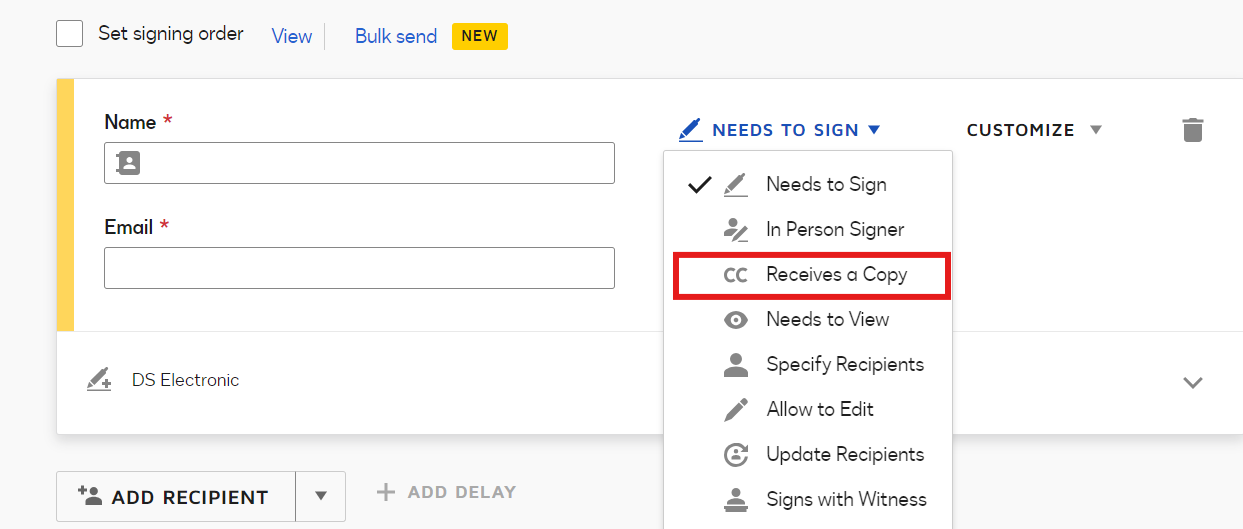
You select “Receives a Copy” while creating the envelope. It will give you the option to enter the Email address to whom you want to send the Signed document copy. Refer the Screenshot below:

Note: you do not need to add the recipient again all the recipients get the copy of signed document.
 

Thanks!

Way to Learn | I'd love your feedback | Hit Like | Mark it Best🌈

4 replies

Pawan Gangwani
Hero
Hero
Oct 10, 2024 6:41 PM UTC

Hello @cournojo 

Welcome to the DocuSign Community!

You select “Receives a Copy” while creating the envelope. It will give you the option to enter the Email address to whom you want to send the Signed document copy. Refer the Screenshot below:

Note: you do not need to add the recipient again all the recipients get the copy of signed document.
 

Thanks!

Translate
Way to Learn | I'd love your feedback | Hit Like | Mark it Best🌈
cournojoNew VoiceAuthor
New Voice
Oct 10, 2024 7:21 PM UTC

Hi Pawan, 


Adding CC (Receives a copy), will they be included in the original email?

Translate
Pawan Gangwani
Hero
Hero
Oct 10, 2024 7:57 PM UTC

Hi Pawan, 


Adding CC (Receives a copy), will they be included in the original email?

No, they will only get the “Complete Signed” Document.

Translate
Way to Learn | I'd love your feedback | Hit Like | Mark it Best🌈
Docusign Employee
Oct 29, 2024 4:34 PM UTC

​Hi @cournojo,


I hope you are doing well.

I would like to confirm if the suggested solution answers your question?           

If so, please mark it as the best answer by clicking “Select as Best” to make it easier for other users to find. Otherwise, feel free to let me know and I will gladly help you address the situation as soon as possible.


Best regards,   


Alejandro R. | Docusign Community Moderator   

"Select as Best" below if you find the answer a valid solution to your issue!   


Translate