Active Voice
Jan 28, 2025 9:11 PM UTC
Solved

Disable Other Options Dropdown

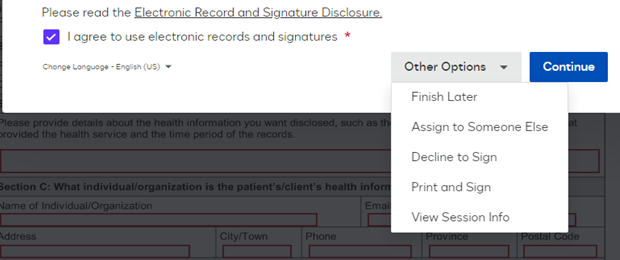
Wanted to ask how to disable/hide the Other Options dropdown box. This prompt appears when user receives and email and then authenticates themselves.

Please let me know how to hide i using admin portal or via API.


JohnSantos
Guru
Jan 28, 2025 9:42 PM UTC

​@karanvir93 

You can do that by adjusting the Signing Resource Files from the Brand for that envelope.  

<root>
<language twoletterisoname="">
    <data name="DocuSign_DeclineAllow">false</data>
    <data name="DocuSign_EnablePrintToFedEx">false</data>
    <data name="DocuSign_FaxAllowForSignOnPaper">false</data>
    <data name="DocuSign_FinishLaterAllow">false</data>
    <data name="DocuSign_PowerFormFinishLaterAllow">FALSE</data>
</language>
</root>

Welcome to the DocuSign Community! Your feedback is highly valued. If you find my response helpful, please give it a "Like" and consider marking it as the "Best Answer" to assist others with similar issues.

4 replies

JohnSantos
Guru
Guru
Jan 28, 2025 9:42 PM UTC

​@karanvir93 

You can do that by adjusting the Signing Resource Files from the Brand for that envelope.  

<root>
<language twoletterisoname="">
    <data name="DocuSign_DeclineAllow">false</data>
    <data name="DocuSign_EnablePrintToFedEx">false</data>
    <data name="DocuSign_FaxAllowForSignOnPaper">false</data>
    <data name="DocuSign_FinishLaterAllow">false</data>
    <data name="DocuSign_PowerFormFinishLaterAllow">FALSE</data>
</language>
</root>

Translate
Welcome to the DocuSign Community! Your feedback is highly valued. If you find my response helpful, please give it a "Like" and consider marking it as the "Best Answer" to assist others with similar issues.
Active Voice
Jan 29, 2025 5:01 PM UTC

Thanks ​@JohnSantos . It worked.
Just more thing: 
I see in master Resource file to change signer but it doesn’t have anything like DocuSign_ChangeSignerAllow as we have for Finish later and Decline Allow

 <data name="DocuSign_ChangeSigner">Assign to Someone Else</data>

how to set not to allow assign to someone else?

Translate
JohnSantos
Guru
Guru
Jan 29, 2025 5:34 PM UTC

​@karanvir93 

For that setting, you need to go to Admin → Signing Settings and under Recipients Uncheck “Allow recipients to change signing responsibility”


Translate
Welcome to the DocuSign Community! Your feedback is highly valued. If you find my response helpful, please give it a "Like" and consider marking it as the "Best Answer" to assist others with similar issues.
Active Voice
Jan 29, 2025 9:17 PM UTC

thanks for your answers
really appreciate :)


Translate