New Voice
Apr 19, 2024 3:22 PM UTC
Solved

Default Text Font and Size

Is there a way to set the default text to a specific font and size? 


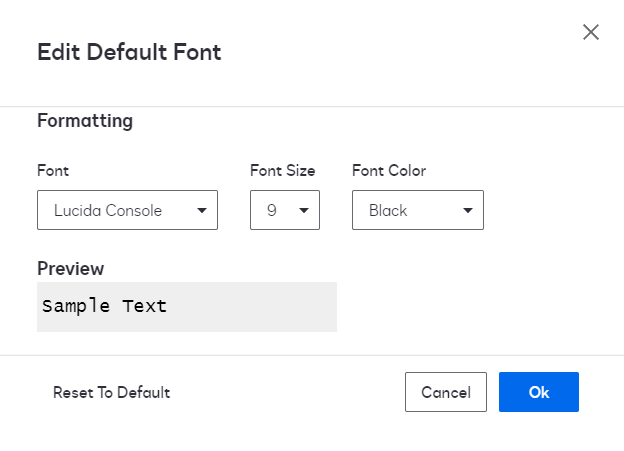
The default settings - Lucida Console, size 9 - are awful.  

JohnSantos
Guru
Apr 19, 2024 4:07 PM UTC

@CoolMustacheGuy - You will find the option to change the default settings under Sending Settings → Fields and Properties


Welcome to the DocuSign Community! Your feedback is highly valued. If you find my response helpful, please give it a "Like" and consider marking it as the "Best Answer" to assist others with similar issues.

4 replies

JohnSantos
Guru
Guru
Apr 19, 2024 4:07 PM UTC

@CoolMustacheGuy - You will find the option to change the default settings under Sending Settings → Fields and Properties


Translate
Welcome to the DocuSign Community! Your feedback is highly valued. If you find my response helpful, please give it a "Like" and consider marking it as the "Best Answer" to assist others with similar issues.
Docusign Employee
May 3, 2024 6:44 PM UTC

Hello @CoolMustacheGuy ,


If you found the provided response to be a useful solution to your question, please mark it as the best answer by clicking “Select as Best” to make it easier for other users to find.


Best regards,

Nathaly | Docusign Community Moderator
"Select as Best" below if you find the answer a valid solution to your issue!

Translate
Newcomer
Aug 13, 2024 12:10 AM UTC

I agree!  It drives me nuts how every time I go in to send a document I have to go into the tab and change it to Helvetica!  ARRRGGGHHHHHHH!!!!!  Why isn’t there an obvious option to change the DEFAULT to my font of choice.?!!  I must give Lucida Console 2 thumbs down!   hahaha.  But it’s true!

Translate
Newcomer
Nov 6, 2024 2:58 PM UTC

I have run into this problem recently, where Lucida Console is the default font for documents sent to Docusign for a Signing Request.  My situation employs the eSignature API to add the documents.


I have changed the default font under the account (Admin → Signing and Sending → Sending Settings → , but the text fields are still showing up with Lucida Console.


I have checked the JSON object sent over via the API and it does not contain explicit ‘font’ definitions.  So why is it not using the account defaults, then?  This lucida console font looks awful for our documents.

Translate