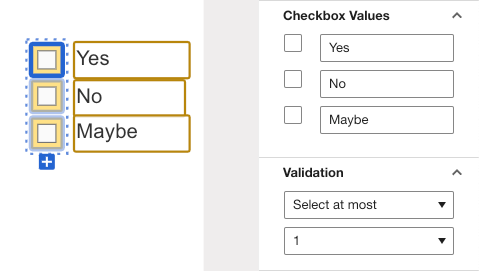
It sounds that you configured a check box group and a validation of “Select at most” to enforce a selection but not more than x values.
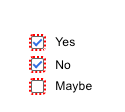
When you select more than 1 when signing the checkbox group will have a red border around them and you cannot complete the action unless you resolve this issue:
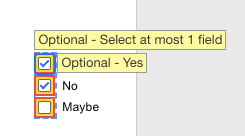
When you hover over the checkbox group you will presented with the error message:
Reading your question it sounds like you checked too many boxes when sending the envelope. I get the following error message as a sender trying to check to many boxes. It contains the name of checkbox group.
"Select as Best" below if you find my answer is a valid solution to your issue and mark it as resolved.
It sounds that you configured a check box group and a validation of “Select at most” to enforce a selection but not more than x values.
When you select more than 1 when signing the checkbox group will have a red border around them and you cannot complete the action unless you resolve this issue:
When you hover over the checkbox group you will presented with the error message:
Reading your question it sounds like you checked too many boxes when sending the envelope. I get the following error message as a sender trying to check to many boxes. It contains the name of checkbox group.
Translate
"Select as Best" below if you find my answer is a valid solution to your issue and mark it as resolved.
You can login or register as either a Docusign customer or developer. If you don’t already have a Docusign customer or developer account, you can create one for free when registering.
You can login or register as either a Docusign customer or developer. If you don’t already have a Docusign customer or developer account, you can create one for free when registering.
 Back to Docusign.com