New Voice
Mar 28, 2024 7:13 PM UTC
Solved

Closing multiple users

I need to close a number of accounts for people who have left the company.

From the help docs I am supposed to select Close users from the dropdown menu under Bulk actions. I am an admin, but the option is not there (see screencap below).

Is there another screen I should be on?
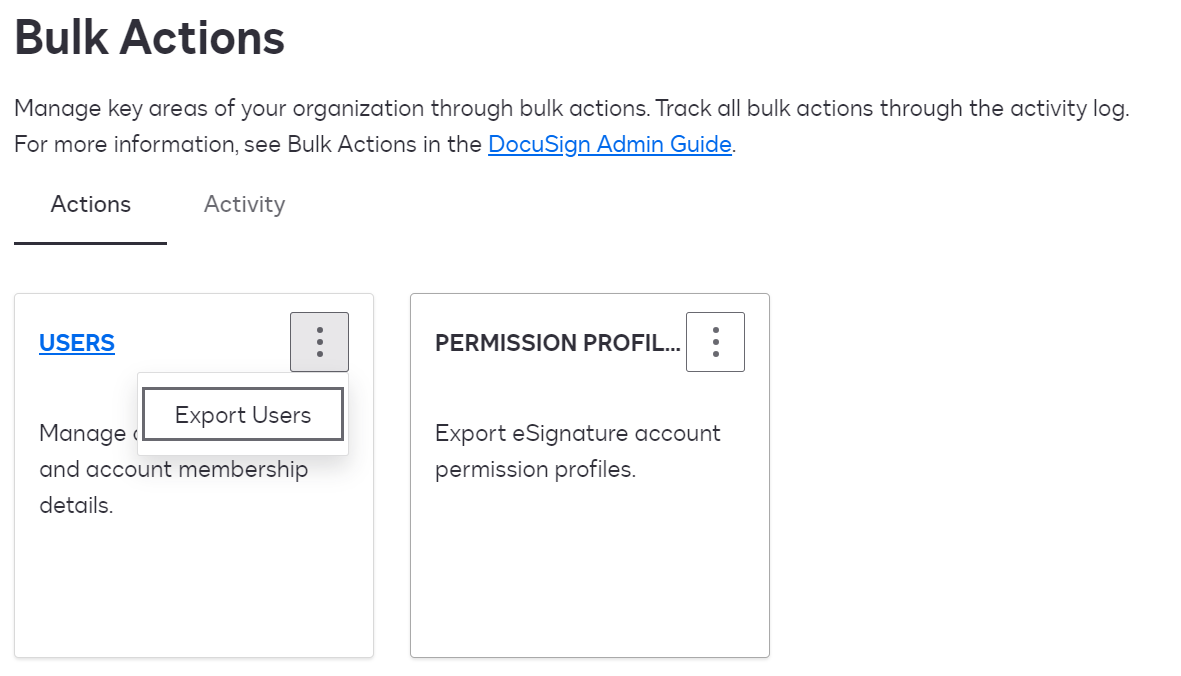
 

Thanks in Advance - Robert

Docusign Employee
Mar 29, 2024 2:28 PM UTC

Hi Robert,


You may want to check this link out
https://support.docusign.com/s/document-item?language=en_US&rsc_301&bundleId=rrf1583359212854&topicId=gbd1583359162678.html&_LANG=enus

Depending on whether you are an administrator of one or multiple accounts the close bulk user functionality varies,

James

7 replies

Alexandre.Augusto
Docusign Employee
Docusign Employee
Mar 28, 2024 7:21 PM UTC

Hello, @rsmith 


Welcome to the DocuSign Community!


Take a look on these two step-by-step articles regarding creating a .CSV file for Bulk action and how to upload the .CSV file to close the list of users.


Build a CSV to Bulk Close Users

Close Organization Users in Bulk


When creating the .CSV file, there are three mandatory columns you must to use. The articles shows which ones.


Let me know if that helped you.

Thanks,

Alexandre

Translate
Your feedback is very appreciated! You can give a Like and mark this answer as the "Best Answer" for your issue. DocuSign University http://dsucustomers.docusign.com
Docusign Employee
Mar 28, 2024 7:47 PM UTC

You may also want to consider using Single Sign On (SSO) if available in your organization and for your account (Enterprise Pro account required).  This allows central control of users so when someone leaves the organization all of their accounts with the different solutions in the organization are closed

Translate
rsmithNew VoiceAuthor
New Voice
Mar 29, 2024 12:52 PM UTC

Hi,


Thanks for getting back to me.

I have tried the guidance on the links, but the Close Users button described in the instructions is not visible (see screenshot below)

and the link to the Sample CSV file does not link to a CSV file.


We do use SSO, but I still need to close dormant accounts.

Thanks - Robert

Translate
Docusign Employee
Mar 29, 2024 2:28 PM UTC

Hi Robert,


You may want to check this link out
https://support.docusign.com/s/document-item?language=en_US&rsc_301&bundleId=rrf1583359212854&topicId=gbd1583359162678.html&_LANG=enus

Depending on whether you are an administrator of one or multiple accounts the close bulk user functionality varies,

James

Translate
rsmithNew VoiceAuthor
New Voice
Apr 1, 2024 4:28 PM UTC

Thanks for the reply, James.
 

I have tried all of the links in the help community.

The issue is they all refer to a “Close users” button that is not visible.
I am a full admin and can close users manually, but the bulk close feature is not available, and if the Bilk Close Users feature has not been activated for some reason I need to activate it.
Is there a way to schedule a Zoom call?

It is entirely possible I am doing something dumb. It has happened before!


Thanks - Robert

Translate
Docusign Employee
Apr 3, 2024 3:37 PM UTC

Robert,

Yes.  Please drop me a line at james.dunmoresmith@docusign.com

Regards,

James

Translate
Docusign Employee
Sep 4, 2024 9:26 PM UTC

​Hi @rsmith,


I hope you are doing well.

I would like to confirm if you could solve your issue?           

Otherwise, feel free to let me know and I will gladly help you address the situation as soon as possible.


Best regards,   


Alejandro R. | Docusign Community Moderator   

"Select as Best" below if you find the answer a valid solution to your issue!   


Translate