Hello! I uploaded a CSV template following Docusign’s v2 bulk import template to share a list of names, email addresses etc. I followed all instructions correctly, yet I keep getting an error on the Email column saying “name” is required (even though I did include Name). Any tips?!
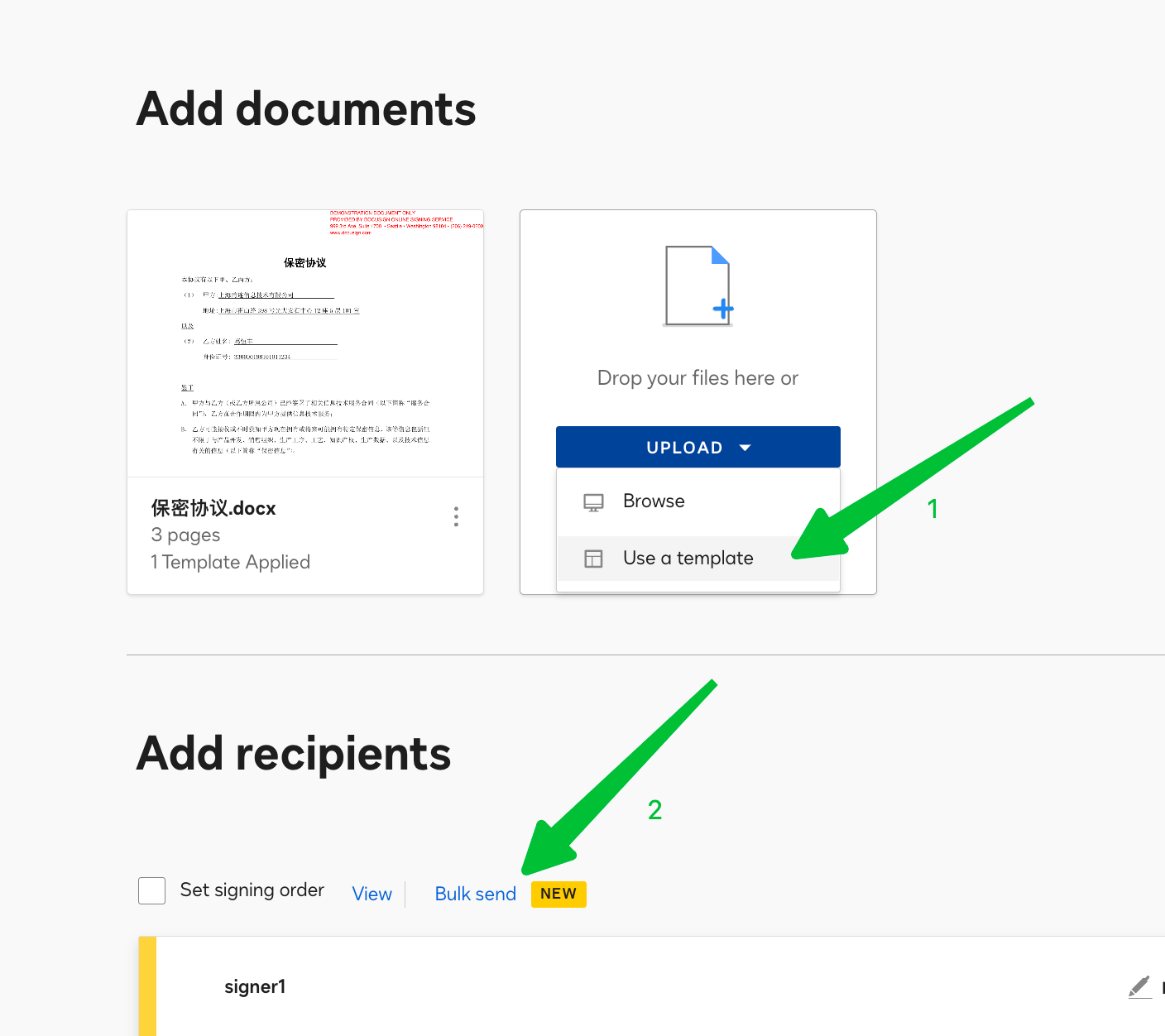
add documents by use a template then click bulk send:
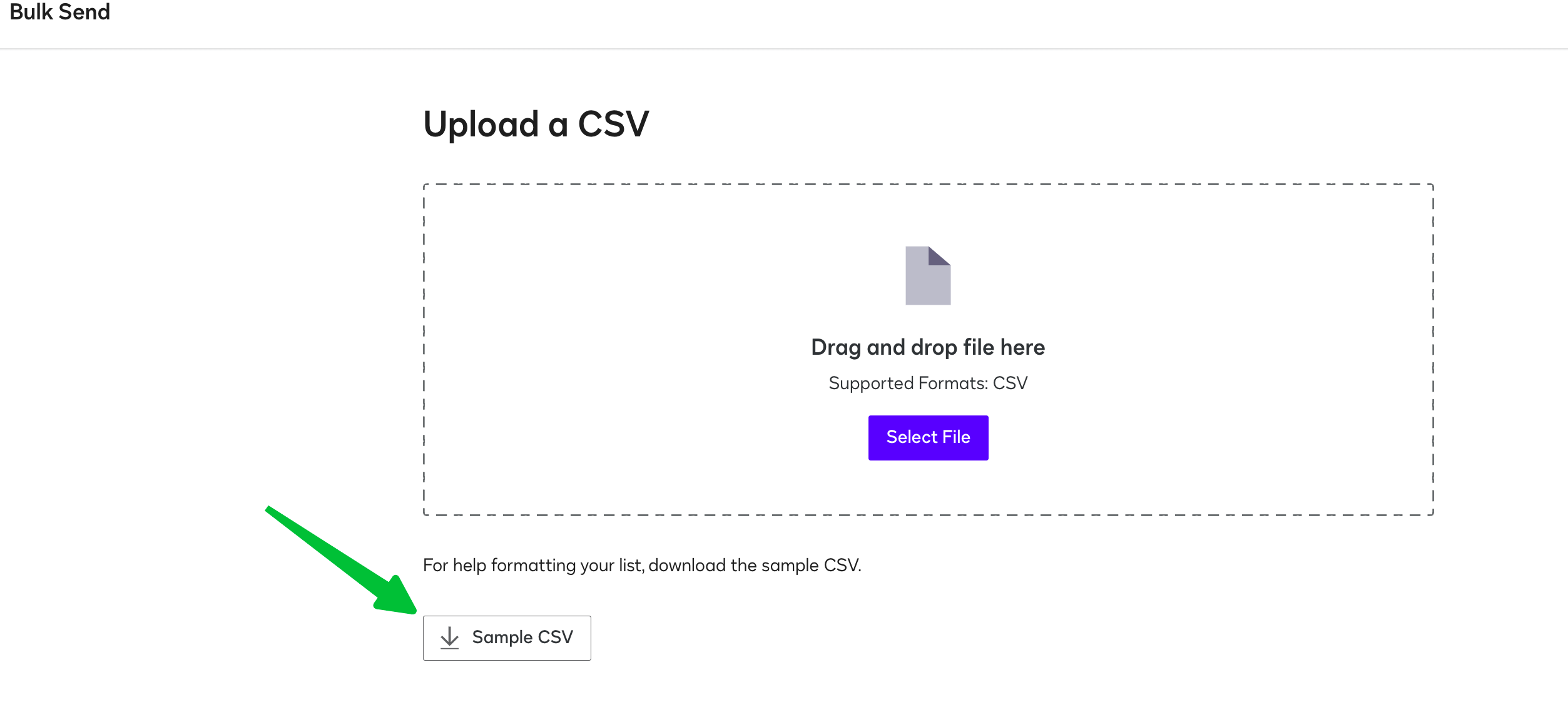
and download the sample CSV.
Hengfeng
FreeLink 🌍 DocuSign Partner | Partner Profile 🏆 2024 APAC Reseller Growth Partner of the Year 🌟 The only DocuSign Partner globally certified as both a Certified eSignature Administrator and eSignature Technical Consultant. 📊 DocuSign Community Leaderboard Top 5 contributor. 🚀 Expertise in DocuSign integrations with on-premises systems for leading enterprises across various industries.
Feel free to reach out for collaboration opportunities.
Welcome to the DocuSign Community! Your feedback is highly valued. If you find my response helpful, please give it a "Like" and consider marking it as the "Best Answer" to assist others with similar issues.
🏆 DocuSign 2024 APAC Reseller Growth Partner of the Year
🌟 The only DocuSign Partner globally certified as both a Certified eSignature Administrator and eSignature Technical Consultant.
📊 DocuSign Community Leaderboard Top 5 contributor.
🚀 Expertise in DocuSign integrations with on-premises systems for leading enterprises across various industries.
Feel free to reach out for collaboration opportunities.
Translate
Welcome to the DocuSign Community! Your feedback is highly valued. If you find my response helpful, please give it a "Like" and consider marking it as the "Best Answer" to assist others with similar issues.
every recipient with two default tabs Name and Email. then the tabs that you added.
Hengfeng
FreeLink 🌍 DocuSign Partner | Partner Profile 🏆 2024 APAC Reseller Growth Partner of the Year 🌟 The only DocuSign Partner globally certified as both a Certified eSignature Administrator and eSignature Technical Consultant. 📊 DocuSign Community Leaderboard Top 5 contributor. 🚀 Expertise in DocuSign integrations with on-premises systems for leading enterprises across various industries.
Feel free to reach out for collaboration opportunities.
Translate
Welcome to the DocuSign Community! Your feedback is highly valued. If you find my response helpful, please give it a "Like" and consider marking it as the "Best Answer" to assist others with similar issues.
add documents by use a template then click bulk send:
and download the sample CSV.
Hengfeng
FreeLink 🌍 DocuSign Partner | Partner Profile 🏆 2024 APAC Reseller Growth Partner of the Year 🌟 The only DocuSign Partner globally certified as both a Certified eSignature Administrator and eSignature Technical Consultant. 📊 DocuSign Community Leaderboard Top 5 contributor. 🚀 Expertise in DocuSign integrations with on-premises systems for leading enterprises across various industries.
Feel free to reach out for collaboration opportunities.
Translate
Welcome to the DocuSign Community! Your feedback is highly valued. If you find my response helpful, please give it a "Like" and consider marking it as the "Best Answer" to assist others with similar issues.
I would like to confirm if the suggested solution answers your question?
If so, please mark it as the best answer by clicking “Select as Best” to make it easier for other users to find. Otherwise, feel free to let me know and I will gladly help you address the situation as soon as possible.
Best regards,
Alejandro R. | Docusign Community Moderator
"Select as Best" below if you find the answer a valid solution to your issue!
You can login or register as either a Docusign customer or developer. If you don’t already have a Docusign customer or developer account, you can create one for free when registering.
You can login or register as either a Docusign customer or developer. If you don’t already have a Docusign customer or developer account, you can create one for free when registering.
 Back to Docusign.com