Our company signed up for Business Pro on 2/10/25. The Docusign description for this product lists that we can “request attachments easily from our recipients”. Now , they are saying its an add-on and costs more. Can anybody help us? We would not have purchased this product if we would have known it now doesn’t include attachments.
Docusign has a few different types of Business Pro plans, which vary depending on the purchasing channel (third party, website, account executive, etc.), but almost all Business Pro plans offer the "Signer Attachment Fields" feature.
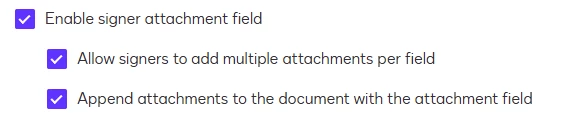
Have you checked if this feature is already available in your account? To do so, please, go to Admin > Sending Settings > Enable signer attachment field.
However, if this feature is not available in your account, I recommend that you open a ticket with the support team to check if your plan includes it. If you have already done so, could you provide me with the ticket number? With this information, I can ask the support team to review the case again.
"Select as Best" below if you find my answer is a valid solution to your issue and mark it as resolved.
Docusign has a few different types of Business Pro plans, which vary depending on the purchasing channel (third party, website, account executive, etc.), but almost all Business Pro plans offer the "Signer Attachment Fields" feature.
Have you checked if this feature is already available in your account? To do so, please, go to Admin > Sending Settings > Enable signer attachment field.
However, if this feature is not available in your account, I recommend that you open a ticket with the support team to check if your plan includes it. If you have already done so, could you provide me with the ticket number? With this information, I can ask the support team to review the case again.
Translate
"Select as Best" below if you find my answer is a valid solution to your issue and mark it as resolved.
If you found the provided response to be a useful solution to your question, please mark it as the best answer by clicking “Select as Best” to make it easier for other users to find.
Best regards,
Nathaly | Docusign Community Moderator "Select as Best" below if you find the answer a valid solution to your issue!
You can login or register as either a Docusign customer or developer. If you don’t already have a Docusign customer or developer account, you can create one for free when registering.
You can login or register as either a Docusign customer or developer. If you don’t already have a Docusign customer or developer account, you can create one for free when registering.
 Back to Docusign.com