Derrick.Tran
Docusign Employee
Mar 26, 2024 5:40 PM UTC

Hello @anchal.misra,


To create or update DocuSign Envelope Templates you will need to have the DocuSign Administrator permission set assigned to your Salesforce User Profile. Your administrator would need to follow the steps listed HERE.


Another thing to check as a DocuSign eSign Administrator is to verify you have the ability to override reminders and expirations. Support article HERE. 

3 replies

Michael.Rave
Docusign Employee
Docusign Employee
Mar 26, 2024 1:40 PM UTC

@anchal.misra 

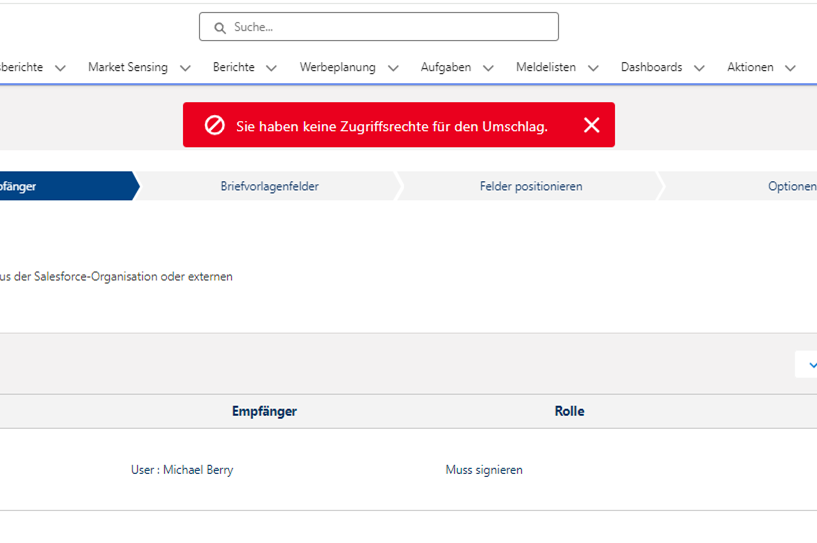
The error message in your screenshot is related to you not having permissions to access the envelope. 

Speak to your Salesforce Administrator to grant you higher permissions, if you need to perform the action.

Translate
"Select as Best" below if you find my answer is a valid solution to your issue and mark it as resolved.
Derrick.Tran
Docusign Employee
Docusign Employee
Mar 26, 2024 5:40 PM UTC

Hello @anchal.misra,


To create or update DocuSign Envelope Templates you will need to have the DocuSign Administrator permission set assigned to your Salesforce User Profile. Your administrator would need to follow the steps listed HERE.


Another thing to check as a DocuSign eSign Administrator is to verify you have the ability to override reminders and expirations. Support article HERE. 

Translate
Docusign Employee
Apr 10, 2024 7:02 PM UTC

Hi @anchal.misra,


I hope you are doing well.


I would like to confirm if you were able to solve your issue by utilizing the solution that was suggested? 


If so, please mark it as the best answer by clicking “Select as Best” to make it easier for other users to find


Otherwise, feel free to let me know and I will gladly help you address the situation as soon as possible.


Best regards,   

Alejandro R. | DocuSign Community Moderator   

"Select as Best" below if you find the answer a valid solution to your issue! 

Translate