Conversation Starter
Jul 7, 2025 10:54 PM UTC
Solved

Is there a way to mass update a single attribute across contracts?

I have several thousand agreements in my CLM.  There is a new Attribute I am being asked to track across them all that was not entered when we migrated them into the system.  I have the new values for all of the agreements in an excel file.  Is there any way to upload a change to enter values to Attributes across many contracts at the same time?  It is prohibitive to go into each contract and add this Attribute one at a time.  It would take far too long.

Michael.Rave
Docusign Employee
Jul 11, 2025 6:37 AM UTC
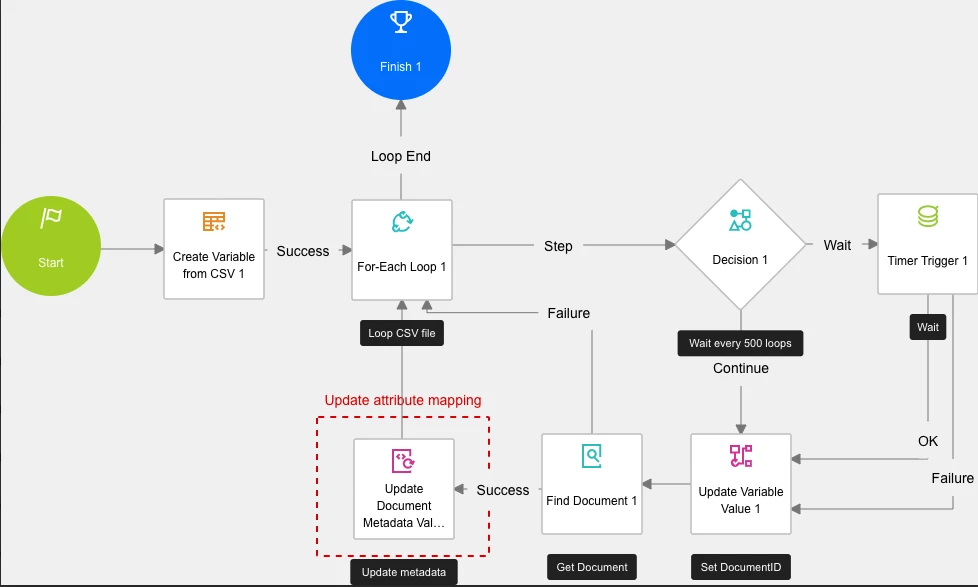
Example workflow to achieve a bulk update of attributes based on a CSV file.


"Select as Best" below if you find my answer is a valid solution to your issue and mark it as resolved.

13 replies

Docusign Employee
Sep 24, 2025 12:05 AM UTC

Interesting! When I set up the workflow in my own account and a run a small sample file, I’m able to get the “Find Document” step to work successfully for every Id in my CSV. One thought you could do is build a failure path from the “Find Document” step which routes back up to the For Each Loop step. That way you can see if it fails on every ID or just a few. 

I don’t think this is the issue but one minor thing I see is the vStepCounter variable in the Update Variable Value 2 step should be incrementing by (roughly) the number of steps being processed in each loop, not set to a static 0. To do that, change vStepCounter to a Number type (right now it’s text). Using the expression builder, set the value of vStepCounter to: Convert.ToInt32(GetVariableValue("vStepCounter")) + 5.


Translate
Kelly Gatling | Principal Product Trainer | Docusign University
Conversation Starter
Oct 5, 2025 9:42 PM UTC

Thanks Kelly!  So, to make it slimmer I removed the timer section altogether and I am just doing these in smaller batches to compensate.  After that and a couple of other tweaks mentioned above, the workflow now works, but only for the first row of the csv file.  No matter what I do, it won’t continue the loop to subsequent rows.  I even added a step for “Next Loop” and tied it back to the “For-Each Loop” step, but no go.  I have double-checked the csv file and it does not contain any hidden spaces or lines and no extra commas at the end of lines when checking via a word editor.  I have double-checked the variables and everything looks right, including when I check the iterator variable.  I’m at a loss as to how to move it along the list.

Translate
Docusign Employee
Oct 13, 2025 12:58 PM UTC

If it doesn’t loop to the next row than it could be an issue with the iterator variable. Your workflow looked right before, I would make sure you are always referencing the iterator variable over anything else because that tells the workflow what to loop on. 

Translate
Kelly Gatling | Principal Product Trainer | Docusign University